Overview
Disclosed on April 3, 2026, BlueHammer is an unpatched Windows privilege escalation vulnerability lacking a CVE or official fix. It exploits a TOCTOU race condition across Microsoft Defender, VSS, Cloud Files API, and oplocks. This flaw allows unprivileged attackers to access credential hives, decrypt NTLM hashes, and gain full SYSTEM-level control before covering their tracks.
Key Takeaways
- BlueHammer is an unpatched Windows privilege escalation vulnerability disclosed on April 3, 2026, without a CVE or a corresponding patch from Microsoft.
- The vulnerability stems from a TOCTOU race condition across four Windows subsystems: Microsoft Defender, Volume Shadow Copy Service (VSS), Cloud Files API, and opportunistic locks (oplocks).
- A successful exploit allows attackers to access the SAM database, decrypt local NTLM password hashes, and gain full SYSTEM-level control over the target machine.
- The exploit chain runs in six stages: detecting a pending Defender update, hijacking the update process, triggering a VSS snapshot, freezing Defender, extracting credential hives, and escalating to SYSTEM while restoring the original password hash to cover tracks.
- Picus Security Validation Platform includes dedicated threats for simulating BlueHammer attacks via both Network Infiltration (Threat ID: 40724) and E-mail Infiltration (Threat ID: 71239) modules.
What is BlueHammer?
BlueHammer is an unpatched privilege escalation vulnerability in Windows. The issue was announced on April 3, 2026, in the absence of coordination with other parties, a CVE, and a corresponding patch from Microsoft.
The root cause of the problem is a TOCTOU (Time-of-Check to Time-of-Use) race condition. Unlike the typical vulnerabilities involving one broken feature, this bug stems from four Windows subsystems working together. These include the Microsoft Defender update routine, Volume Shadow Copy Service (VSS), Cloud Files API, and opportunistic locks (oplocks). All subsystems are doing their job properly; however, if used together in a special way, a bug emerges.
There is no need for any kernel exploits. No code execution, memory corruption, or any other tricks are involved. An unprivileged account is enough to execute the exploit successfully, leading to the launch of a SYSTEM shell.
What Is the Impact of BlueHammer Vulnerability?
BlueHammer gives a low-privileged attacker full control over a Windows system. The attacker who successfully exploits it can do the following:
- Access the SAM database from a live VSS snapshot.
- Decrypt NTLM password hashes stored locally.
- Start a SYSTEM-level command prompt in the current user session.
How Does BlueHammer Vulnerability Work?
The exploit chain is executed in six discrete stages [1]. Each stage is described below.
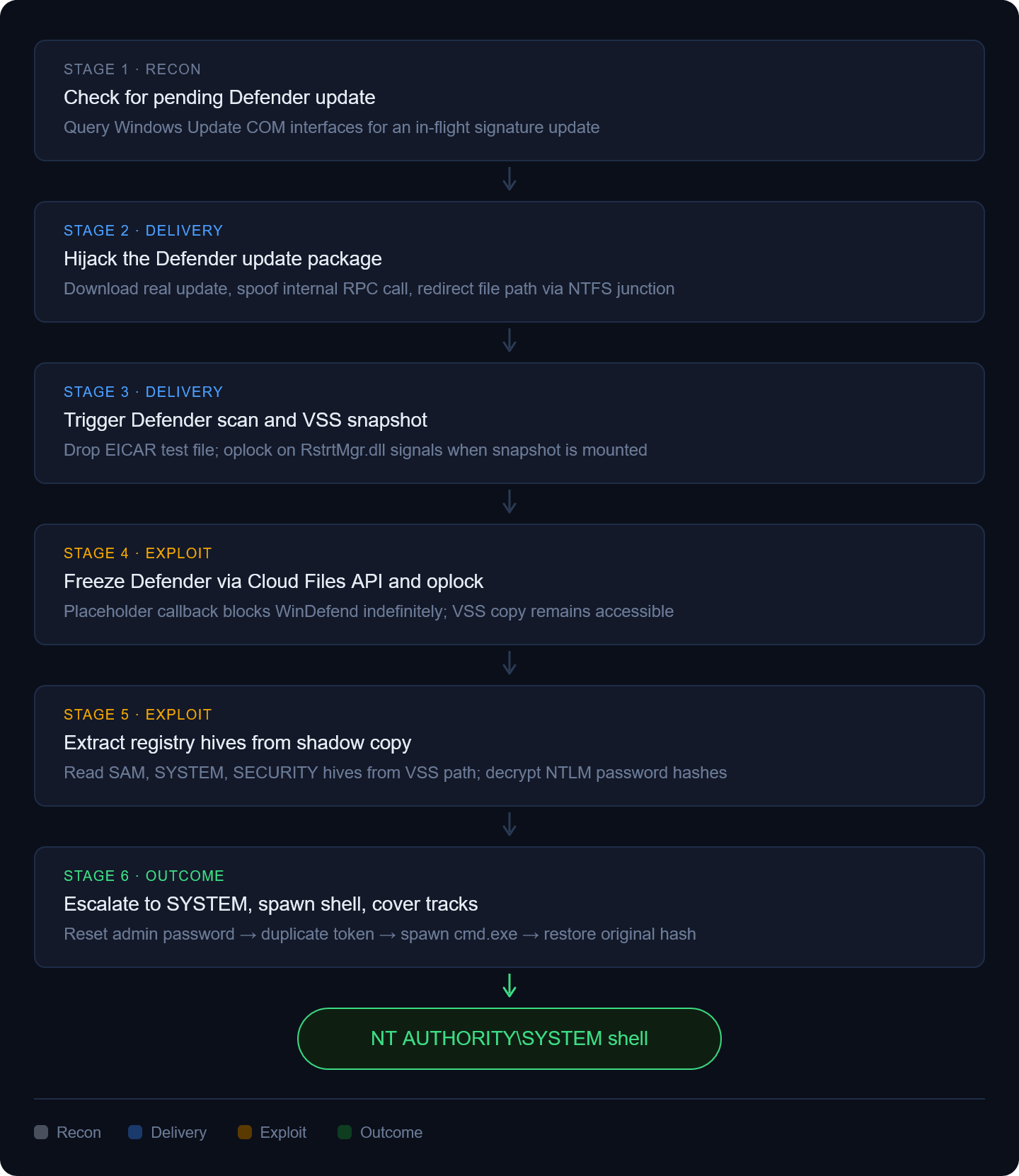
Figure 1. Steps of BlueHammer Vulnerability Exploitation
Stage 1: Check for a Pending Defender Signature Update
The exploit begins by querying the Windows Update COM interfaces to determine whether a Defender signature update is pending. Without one in flight, Defender will not trigger the VSS-creating workflow that the chain depends on.
# The URL for checking signature updates https://go.microsoft[.]com/fwlink/?LinkID=121721&arch=x64Stage 2: Download and Unpack the Defender Update Package
The exploit connects to Microsoft's own update distribution URL and downloads a real Defender update executable.
Then it parses that executable in memory without writing anything to disk. Inside the executable's .rsrc (resource) section sits an embedded CAB file named update.cab. The exploit extracts and unpacks that archive entirely in memory.
Those unpacked files are then fed into a spoofed RPC call targeting ServerMpUpdateEngineSignature, an internal Defender method. By calling this internal method directly, the exploit instructs Defender to process an update as if it came through a normal update channel.
Finally, NTFS junctions are used to redirect the update file path. An NTFS junction is a filesystem-level redirect, similar to a symbolic link. The junction points Defender toward a directory the attacker controls instead of the legitimate update location. Defender follows the path without questioning where it leads.
As a result, Defender processes what it believes is a normal update, sourced from Microsoft, delivered through its own internal API, while the attacker controls where Defender reads the files from.
Stage 3: Trigger Defender to Scan and Create a Shadow Copy
At this stage, a temporary directory is created. An EICAR test file named foo.exe is written into it. EICAR is a standard antivirus test string that every Defender build recognizes as malicious. This triggers Defender to start scanning and begin its remediation workflow, which includes creating a VSS snapshot.
VSS is a Windows feature that creates point-in-time snapshots of the filesystem. Backup tools, system restore, and antivirus software all use it. When VSS creates a snapshot, a read-only copy of the drive is mounted as a separate device, for example, \Device\HarddiskVolumeShadowCopy12.
The snapshot is what makes the important credential files reachable later, but the exploit first needs to know exactly when Defender's workflow is running.
To detect that moment, a batch oplock is placed on RstrtMgr.dll, a library Defender accesses during remediation. A batch oplock persists silently until a second process tries to open the same file. The kernel then immediately notifies the oplock holder that the lock broke. When Defender touches RstrtMgr.dll, that break fires and tells the exploit that Defender is active and the snapshot is incoming. At the same time, a background thread polls \Device via NtQueryDirectoryObject, watching for a new HarddiskVolumeShadowCopy device entry to confirm the snapshot is fully mounted and ready.
Stage 4: Freeze Defender Using the Cloud Files API and Oplocks
The main purpose of this stage is to freeze Defender and give some time to the attacker to read the VSS snapshot.
To do this, the exploit registers the current directory as a Cloud Files sync root using CfRegisterSyncRoot() and CfConnectSyncRoot(). A randomly named .lock placeholder file is dropped inside that sync root.
When Defender enumerates the directory and touches the placeholder, the CfCallbackFetchPlaceHolders callback fires. The exploit checks the caller's PID to confirm it is the WinDefend service process. Once confirmed, a second batch oplock is immediately acquired on the .lock file.
The callback refuses to return while the oplock is held. Defender calls:
GetOverlappedResult(hlock, &ovd, &nwf, TRUE);and blocks. It waits for a response that never comes. The VSS snapshot is still mounted. The credential files inside it are now accessible.
Stage 5: Access Registry Hives From the Shadow Copy
With Defender frozen, the exploit opens the three registry hives directly from the shadow copy device path.
\\Device\\HarddiskVolumeShadowCopy12\\Windows\\System32\\Config\\SAM \\Device\\HarddiskVolumeShadowCopy12\\Windows\\System32\\Config\\SYSTEM\\Device\\HarddiskVolumeShadowCopy12\\Windows\\System32\\Config\\SECURITYThese three files store Windows credential data.
- The SAM hive holds local account password hashes.
- The SYSTEM hive holds the boot key needed to decrypt them.
- The SECURITY hive holds LSA secrets.
At runtime, these files are locked by the kernel and unreadable by any non-SYSTEM process. Through a VSS snapshot, the same files are accessible without those locks.
Stage 6: Privilege Escalation, Shell Spawning, and Cleanup
With the NTLM hashes decrypted, the exploit escalates to NT AUTHORITY\SYSTEM in four steps:
- Reset the Administrator password: SamrChangePasswordUser forcibly sets a local Administrator account to an attacker-controlled password.
- Authenticate and elevate: LogonUserEx logs in as that Administrator. The resulting security token is then duplicated and assigned the SYSTEM integrity level.
- Spawn a SYSTEM shell: CreateService registers a temporary malicious service, which relaunches the exploit binary. This time, it spawns cmd.exe as NT AUTHORITY\SYSTEM inside the active user session.
- Cover tracks: SamrChangePasswordUser is called a second time to restore the original NTLM hash. From the outside, the Administrator account's password appears completely unchanged.
How Picus Simulates BlueHammer Vulnerability Attacks?
We also strongly suggest simulating BlueHammer vulnerability attacks to test the effectiveness of your security controls against real-life cyber attacks using the Picus Security Validation Platform. You can also test your defenses against other vulnerability exploitation attacks, such as regreSSHion, Citrix Bleed, and Follina, within minutes with a 14-day free trial of the Picus Platform.
Picus Threat Library includes the following threats for the BlueHammer vulnerability attacks:
|
Threat ID |
Threat Name |
Attack Module |
|
40724 |
Windows Defender BlueHammer Elevation of Privilege Vulnerability Threat |
Network Infiltration |
|
71239 |
Windows Defender BlueHammer Elevation of Privilege Vulnerability Threat |
E-mail Infiltration |
Start simulating emerging threats today and get actionable mitigation insights with a 14-day free trial of the Picus Security Validation Platform.
References
[1] R. Ramesh and R. Jayapaul, “BlueHammer: Inside the Windows Zero-Day.” Accessed: Apr. 15, 2026. [Online]. Available: https://www.cyderes.com/howler-cell/windows-zero-day-bluehammer







-3.png?width=353&height=200&name=image%20(61)-3.png)