.svg)



.svg)


What Is T1059.002 AppleScript in MITRE ATT&CK?
T1059.002 AppleScript is a sub-technique of Command and Scripting Interpreter (T1059) in the MITRE ATT&CK framework, under the Execution tactic. AppleScript is a macOS scripting language used to automate tasks and control applications, primarily through AppleEvents, an interprocess communication mechanism.
AppleEvents cannot initiate remote applications, but they can interact with and manipulate applications that are already running. This enables actions such as interacting with open SSH sessions or generating user-facing dialogs. AppleScript can also be executed via native macOS APIs such as NSAppleScript, and through the osascript command-line utility available on modern macOS systems (including macOS 10.10 Yosemite and later).
To read about other sub-techniques of the T1059 Command and Scripting Interpreter technique, you can visit the related hub blog.
Adversary Use of T1059.002 AppleScript
Adversaries use T1059.002 AppleScript to execute malicious commands and automate actions on macOS systems using a built-in, trusted scripting language. Because AppleScript and osascript are legitimate components of macOS, their use can blend into normal administrative or automation activity and evade controls focused on third-party tools or unsigned binaries.
In malicious campaigns, AppleScript is commonly leveraged to launch applications, execute shell commands, interact with system dialogs, manipulate files, and trigger follow-on payloads, often as part of phishing-driven execution chains, installer packages, or multi-stage loaders. By abusing AppleScript’s tight integration with macOS applications and AppleEvents, attackers can support stealthy execution and payload delivery, especially in environments where scripting activity is not closely monitored.
Procedure Examples Used by Adversaries in Red Report 2026
Credential Access with GUI Input Capture (T1056.002)
Through GUI-based input capture, adversaries create dialogs that mimic legitimate system prompts and trick users into revealing credentials.
In a February 2025 analysis, attackers used a fake DeepSeek macOS installer to deliver Atomic macOS Stealer (AMOS) and abused AppleScript to stealthily display a password prompt and execute the payload [1].
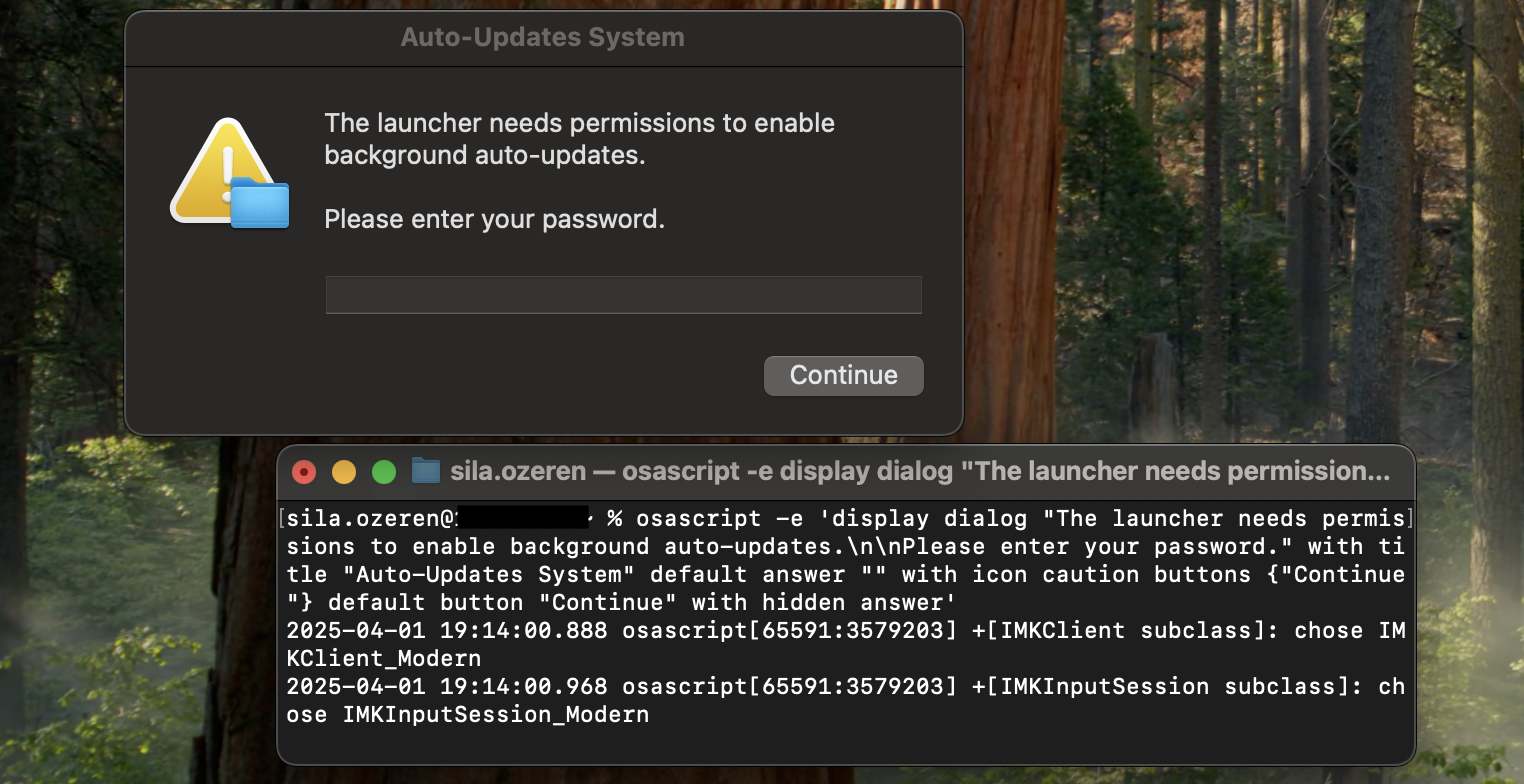
One observed command was:
|
osascript -e 'display dialog "The launcher needs permissions to enable background auto-updates.\n\nPlease enter your password." with title "Auto-Updates System"default answer "" with icon caution buttons {"Continue"} default button "Continue" with hidden answer' |
The osascript call runs an AppleScript that creates a modal dialog box containing explanatory text, a masked password field (with hidden answer), and a single "Continue" button. To the user this looks like a legitimate system request. When the user types their password and submits, the script captures the string and returns it to the caller (the malware process).
The attacker can then reuse the credential locally (e.g., via sudo or security CLI), add it to a keychain, or exfiltrate it to a C2 server for remote misuse.
Procedure Examples Used by Adversaries in Red Report 2025
AppleScript can be used to abuse elevation control mechanisms on macOS systems, enabling adversaries to gain elevated privileges and execute malicious actions.
For instance, the AppleScript command given below is used by the HeavyLift malware to elevate its privileges on macOS systems [2]. Upon execution, HeavyLift determines the operating system it is running on. If it detects macOS and finds that it does not have root privileges, it uses the following command:
|
/usr/bin/osascript -e 'do shell script "bash -c " _process_path " with administrator privileges' |
This command leverages osascript, a macOS utility for running AppleScript, to execute a shell command (bash -c) as an administrator. The placeholder _process_path represents the path to the malicious payload or script that the malware aims to execute with elevated privileges. By appending the with administrator privileges clause, the malware triggers a system prompt to grant root access, allowing it to bypass restrictions and carry out its malicious activities.
This technique highlights how adversaries exploit legitimate macOS features to achieve privilege escalation, underscoring the importance of monitoring and restricting the use of such utilities to mitigate potential threats.
Credential Access with GUI Input Capture (T1056.002)
Through GUI-based input capture, adversaries can create scenarios that seamlessly mimic legitimate system behaviors, effectively harvesting credentials without arousing immediate suspicion.
One perfect example is from MacStealer's methodology where the adversaries employ osascript to execute AppleScript code inline [3]. This generates a deceptively simple yet persuasive dialog box. For instance, an attacker might execute the following command:
|
osascript -e 'display dialog "MacOS wants to access the System Preferences." with title "System Preferences" with icon caution default answer "" with hidden answer' |
This script creates a pop-up dialog designed to resemble a legitimate macOS system prompt. The crafted message, "macOS wants to access the System Preferences," is paired with an authoritative title and a cautionary icon to instill a false sense of urgency. The inclusion of a hidden text input field further reinforces the illusion of a routine security measure, subtly coaxing the user into entering their credentials.
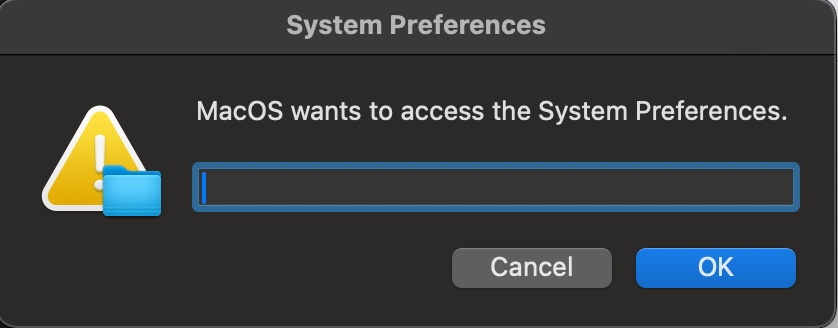
This technique, while straightforward, capitalizes on the inherent trust users place in system prompts. It underscores the adversary's ability to exploit human behavior as a vector for initial access.
Procedure Examples Used by Adversaries in Red Report 2024
Starting a Launch Daemon (T1543.004)
Adversaries can leverage the osascript to load and start a daemon [4].
|
osascript -e 'do shell script "sudo launchctl load -w /Library/LaunchDaemons/com.apple.questd.plist && sudo launchctl start com.apple.questd" with administrator privileges' |
This command automates the activation of a daemon (background service) named questd, often without the user's knowledge. This is achieved by using AppleScript to execute a shell script with elevated rights, enabling the questd service to run automatically at system startup and potentially perform unwanted or harmful actions.
Credential Access with GUI Input Capture (T1056.002)
Adversaries can leverage AppleScript to lure victims into a GUI-based input capture to steal valid account credentials. For instance, in December 2023, macOS malware was observed leveraging the osascript to pop up a message prompting users to enter their credentials. [5].
|
osascript -e 'display dialog "Required System Upgrade. Please enter passphrase for berri." default answer "" with icon caution buttons {"Continue"} default button "Continue" giving up after 150 with title "Application wants to install helper"' |
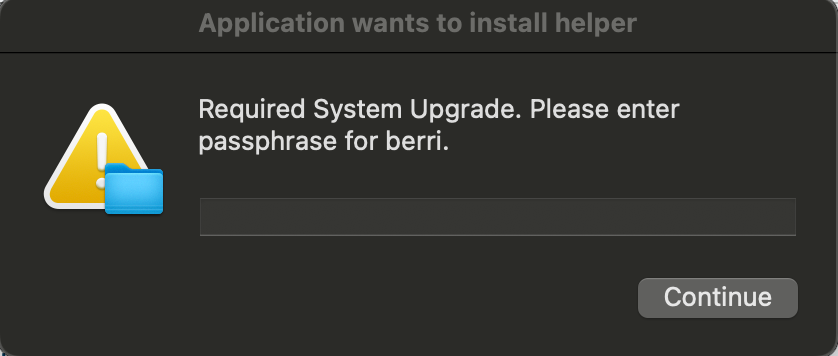
The same tactic is observed in another macOS malware in November 2023 [6], leveraging osascript, which is crafted to display a dialog box that mimics a legitimate system upgrade notification.
|
osascript -e 'display dialog "Required System Upgrade. Please enter passphrase for root." default answer "" with icon caution buttons {"Continue"} default button "Continue" giving up after 150 with title "Application wants to install helper" with hidden answer' |
The dialog box prompts the user to enter their root passphrase, ostensibly for a system upgrade, using persuasive language and design elements like a caution icon and official-sounding button labels. It's set to accept input with the answer hidden, similar to password fields. The script's intention is deceptive: it tries to trick the user into providing their sensitive root password under the guise of a necessary system action.
Validate Your Defenses Against the Red Report 2026 Threats
References
[1] S. Ö. Hacıoğlu, “Atomic Stealer: Dissecting 2024’s Most Notorious macOS Infostealer,” Apr. 10, 2025. Available: https://www.picussecurity.com/resource/blog/atomic-stealer-amos-macos-threat-analysis. [Accessed: Nov. 04, 2025]
[2] C. Talos, “Operation Celestial Force employs mobile and desktop malware to target Indian entities,” Cisco Talos Blog, Jun. 13, 2024. Available: https://blog.talosintelligence.com/cosmic-leopard/. [Accessed: Nov. 26, 2024]
[3] “AppleScript,” Red Canary, Mar. 11, 2024. Available: https://redcanary.com/threat-detection-report/techniques/applescript/. [Accessed: Nov. 26, 2024]
[4] Joe Security LLC, “Automated Malware Analysis Report for Mixed In Key 8.pkg - Generated by Joe Sandbox,” Joe Security LLC. Available: https://www.joesandbox.com/analysis/430666/0/html. [Accessed: Dec. 18, 2023]
[5] Joe Security LLC, “Automated Malware Analysis Report for y8g2Ga0Gas - Generated by Joe Sandbox,” Joe Security LLC. Available: https://www.joesandbox.com/analysis/1339915/0/html. [Accessed: Dec. 18, 2023]
[6] Joe Security LLC, “Automated Malware Analysis Report for 1rNsYj4HBT - Generated by Joe Sandbox,” Joe Security LLC. Available: https://www.joesandbox.com/analysis/1323173/0/html. [Accessed: Dec. 18, 2023]
[7] S. Ö. Hacıoğlu, “What Is Adversarial Exposure Validation?,” Feb. 02, 2026. Available: https://www.picussecurity.com/resource/blog/what-is-adversarial-exposure-validation. [Accessed: Feb. 09, 2026]