What Is T1547.002 Authentication Package in MITRE ATT&CK?
T1547.002 Authentication Package is a technique in the MITRE ATT&CK framework under the Persistence tactic. It refers to the abuse of authentication packages in Windows to maintain persistent access to a compromised system.
Authentication packages, typically implemented as Dynamic Link Libraries (DLLs), are loaded by the Local Security Authority (LSA) during system startup. Their primary function is to handle the system's logon process and enforce security protocols. These packages are crucial for managing user authentication and security on Windows, as they interact with system processes to control and verify access credentials.
To read about other sub-techniques of the T1547 Boot Logon or Auto Start Execution technique, you can visit the related hub blog.
Adversary Use of T1547.002 Authentication Package
Adversaries exploit T1547.002 Authentication Package to gain persistence within a system by manipulating or adding custom authentication packages that automatically load during system startup. By placing a malicious authentication package into the system’s security framework, attackers can ensure that their malicious code is executed when the LSA process loads authentication packages.
This allows adversaries to gain unauthorized access to the system, bypass security measures, and potentially maintain persistent footholds without raising immediate suspicion. The custom authentication package can also be used to escalate privileges, steal credentials, or manipulate user authentication in a way that evades detection by traditional security tools. By exploiting the authentication package process, attackers can blend malicious activity with legitimate system operations, making it difficult for defenders to detect and remove the threat.
Procedure Examples Used by Adversaries in Red Report 2026
Adversaries often exploit Windows systems by manipulating the Registry to gain persistent and elevated access. A common tactic involves targeting the HKLM\SYSTEM\CurrentControlSet\Control\Lsa key, which is critical for authentication processes. To achieve this, attackers might execute a command like the following:
|
reg add "HKLM\SYSTEM\CurrentControlSet\Control\Lsa" /v "Authentication Packages" /t REG_MULTI_SZ /d "C:\Path\To\evil.dll" /f |
This command adds their malicious DLL (evil.dll) to the list of authentication packages. When the system boots, the LSA process, which runs with high privileges, loads this DLL. Consequently, the malicious code gains elevated privileges and executes seamlessly within the system context. By embedding their code in such a critical system process, adversaries ensure that their payload remains active and undetected, executing with every system startup.
In the analysis conducted by Picus Security in March 2025, the SLOW#TEMPEST cyber espionage campaign was observed using this particular technique to enable Restricted Admin Mode on a local machine [1]. This was achieved through registry manipulation, a common method employed by advanced persistent threat (APT) actors to escalate privileges and bypass security restrictions.
The process begins with the reg.exe add command, which modifies a registry value in the LSA settings.
|
#Process 1 |
By targeting the path "hklm\system\currentcontrolset\control\lsa", the attacker adds the disablerestrictedadmin value, which directly controls Restricted Admin Mode.
Setting the value to /d 00000000 disables this mode, and /t reg_dword specifies the value as a 32-bit integer. The /f flag forces the change without confirmation, weakening security and potentially facilitating further attacks.
After modifying the registry, the attacker uses the reg.exe query command to verify the change. This command checks the same registry path to ensure the disablerestrictedadmin value has been applied correctly.
|
#Process 2 |
This verification step ensures that Restricted Admin Mode has indeed been disabled. In summary, through this registry manipulation, SLOW#TEMPEST bypasses administrative access limitations on compromised systems, potentially enabling broader lateral movement or persistence within a network. Because registry changes may go unnoticed by traditional security mechanisms, this technique remains a stealthy method often used in advanced cyber espionage operations.
Procedure Examples Used by Adversaries in Red Report 2025
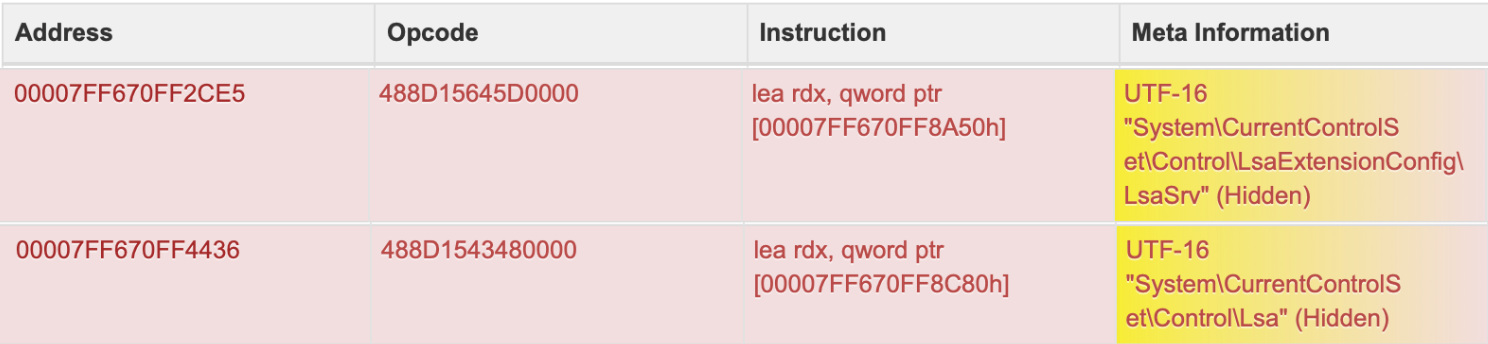
According to a malware sandbox analysis that was done in June 2024 [2], we are seeing a persistence mechanism tied to the Windows Local Security Authority system.
|
SHA256*: efa9e8325232bbd3f9a118d396de04370e56c3c7b6d552fab46b5b39f3ad522d |
The malware manipulates the registry paths System\CurrentControlSet\Control\LsaExtensionConfig\LsaSrv and System\CurrentControlSet\Control\Lsa, as indicated by the instructions loading these strings into the rdx register. These registry keys play a significant role in configuring LSA extensions and authentication packages, both of which are essential for the system's logon and security processes. By modifying these keys, the malware ensures that its malicious code is loaded by the highly privileged LSA process (lsass.exe) during every system startup, achieving persistence.
The "Hidden" attribute in the metadata suggests that the malware employs obfuscation techniques to conceal these registry changes from standard inspection tools, increasing its stealth. The lea rdx, qword ptr instructions prepare the registry key addresses for further operations, such as querying, modifying, or injecting malicious DLLs. This behavior aligns with common tactics where adversaries use the Lsa or LsaExtensionConfig keys to load their payloads, allowing execution within the trusted and elevated context of the LSA process.
It makes detection and remediation particularly challenging, as tampering with these registry keys or the lsass.exe process can destabilize the system. Ultimately, this persistence method ensures that the malware remains active across reboots, embedded in a critical system process that provides both elevated privileges and stealth.
Procedure Examples Used by Adversaries in Red Report 2024
According to CISA's cybersecurity advisory released in December 2023 [3], the Russian Foreign Intelligence Service (SVR) runs the following reg command on their victim's system:
|
reg add HKEY_LOCAL_MACHINE\SYSTEM\CurrentControlSet\Control\Lsa /v NoLMHash /t REG_DWORD /d "0" /f |
This command targets the NoLMHash value within the HKEY_LOCAL_MACHINE\SYSTEM\CurrentControlSet\Control\Lsa path of the Registry. However, setting the NoLMHash value to 0 does not disable a security feature. Instead, it enables the storage of LM hash values of passwords. LM hashes are less secure due to their vulnerability to brute-force attacks, and modern Windows systems typically do not store LM hashes by default for enhanced security. Therefore, this command actually weakens password security by enabling the storage of these less secure hashes.
In addition, the Russian Foreign Intelligence Service (SVR) also modified the DisableRestrictedAdmin key to enable remote connections with the following reg command [3].
|
reg add HKEY_LOCAL_MACHINE\SYSTEM\CurrentControlSet\Control\Lsa /v DisableRestrictedAdmin /t REG_DWORD /d "0" /f |
This command specifically targets the DisableRestrictedAdmin value within the HKEY_LOCAL_MACHINE\SYSTEM\CurrentControlSet\Control\Lsa path. By setting DisableRestrictedAdmin to 0 and using the /f flag to force the update, the SVR effectively disabled the Restricted Admin mode for Remote Desktop Protocol (RDP) connections. Restricted Admin mode is a security feature in Windows that, when enabled, provides a more secure environment for RDP by not allowing credentials to be sent to the remote system. By disabling this feature, the SVR enhanced its ability to remotely connect to compromised systems without the usual security restrictions imposed by Windows.
Validate Your Defenses Against the Red Report 2026 Threats
References
[1] S. Ö. Hacıoğlu, “SLOW#TEMPEST: Explaining the TTPs of the Cyber Espionage Campaign,” Mar. 05, 2025. Available: https://www.picussecurity.com/resource/blog/slow-tempest-cyber-espionage-ttp-analysis. [Accessed: Dec. 15, 2025]
[2] Joe Security LLC, “Automated Malware Analysis Report for lsass.exe - Generated by Joe Sandbox,” Joe Security LLC. Available: https://www.joesandbox.com/analysis/1451836/0/html. [Accessed: Dec. 09, 2024]
[3] “Russian Foreign Intelligence Service (SVR) Exploiting JetBrains TeamCity CVE Globally,” Cybersecurity and Infrastructure Security Agency CISA. Available: https://www.cisa.gov/news-events/cybersecurity-advisories/aa23-347a. [Accessed: Dec. 25, 2023]