
A Bring Your Own Vulnerable Driver (BYOVD) attack is a privilege-escalation and defense-evasion technique in which an adversary loads a legitimately signed but vulnerable kernel driver onto a target system, then exploits the driver's known flaws to execute code at kernel level and disable security tooling. Frequently abused drivers include RTCore64.sys, gdrv.sys, mhyprot2.sys, and procexp.sys — used by ransomware operators (BlackByte, AvosLocker, LockBit) and APT groups to terminate EDR processes, blind monitoring agents, and tamper with Windows kernel structures.
With kernel access, adversaries can terminate EDR processes, disable security tools, tamper with kernel callbacks, and bypass endpoint protections. Because the driver is trusted and signed, BYOVD effectively abuses Microsoft’s driver trust model to evade defenses.
In the MITRE ATT&CK framework, BYOVD maps to T1068 – Exploitation for Privilege Escalation and often overlaps with T1562.001 – Impair Defenses: Disable or Modify Tools. It has become a favored technique among ransomware groups and APT actors seeking stealthy privilege escalation and defense evasion.
How Do BYOVD Attacks Work? Step-by-Step Technical Breakdown
In a BYOVD attack, threat actors with administrative privileges install a legitimate, digitally signed driver that contains known vulnerabilities onto a target system. By exploiting these specific driver flaws, attackers gain critical kernel-level access, which enables them to bypass or disable endpoint security controls such as EDR and antivirus solutions.
Here is how a typical BYOVD attack unfolds:
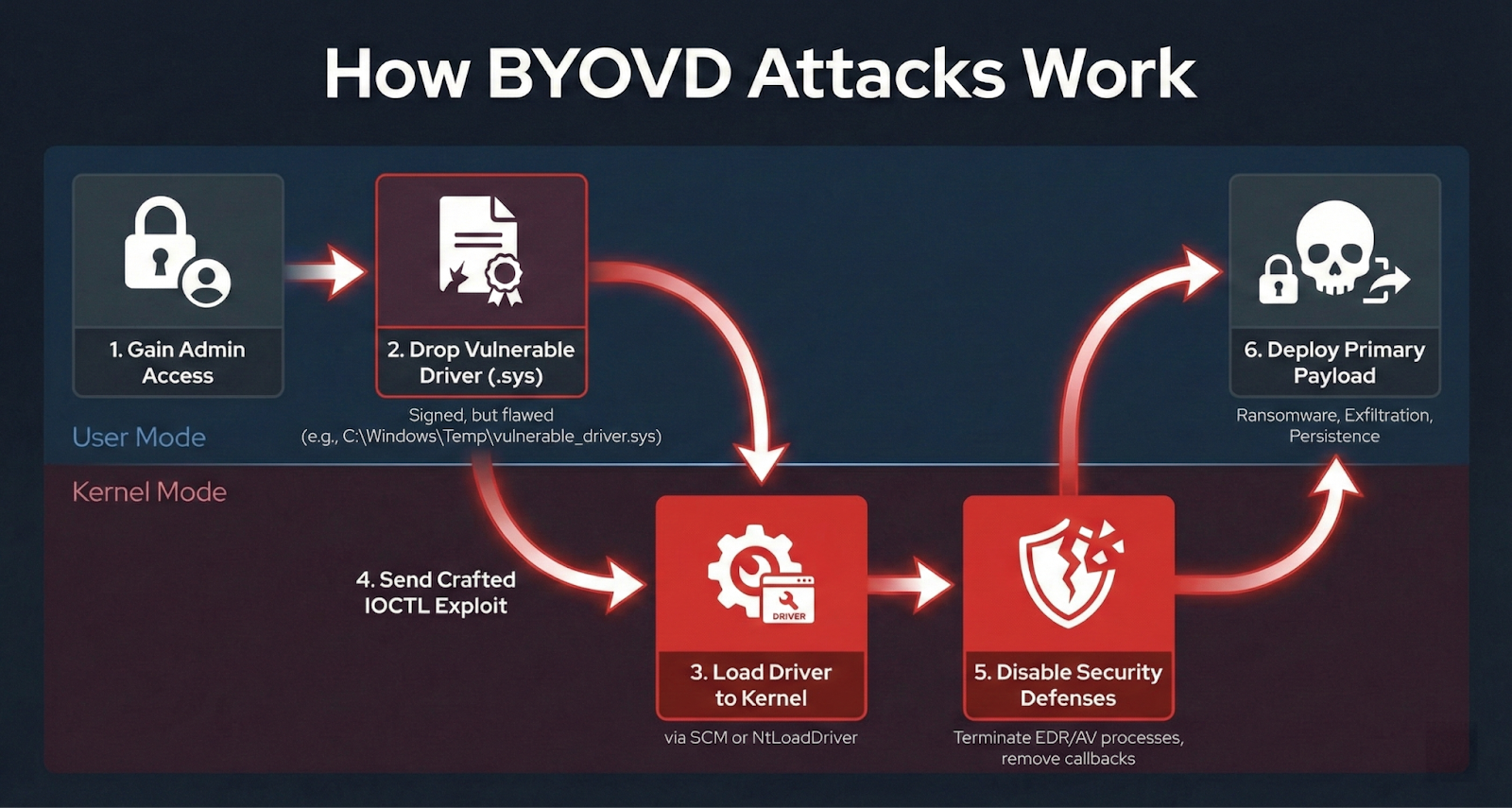
Kill-chain flow from initial access to payload deployment
Step 1: Attacker Obtains Administrative Privileges Before BYOVD Execution
BYOVD is not an initial access technique. It requires the attacker to already have local admin privileges on the target system. These privileges are typically gained through methods like phishing, exploiting a public-facing application, or purchasing access from an initial access broker.
Step 2: Dropping a Vulnerable Driver File to Disk for Exploitation
The attacker places the .sys file (vulnerable driver) in a writable directory, such as C:\Windows\Temp or C:\Users\Public. This driver is typically legitimate, often taken directly from a vendor’s own installer, making it harder to detect.
Step 3: Registering and Loading the Vulnerable Driver in Windows
The attacker registers and loads the vulnerable driver using Windows Service Control Manager. This is accomplished with commands like:
|
sc.exe create vuln_driver type= kernel binPath= C:\Windows\Temp\vulnerable_driver.sys |
Or programmatically via the NtLoadDriver API.
Step 4: Exploiting the Driver via Crafted IOCTL Requests
Once the driver is loaded, the attacker interacts with it using DeviceIoControl calls. This allows the attacker to send specific I/O control codes that exploit the vulnerability.
For example, RTCore64.sys exposes IOCTL codes enabling arbitrary physical and virtual memory read/write.
Step 5: Disabling Endpoint Security Tools Using Kernel Access
With kernel access, attackers use the read/write primitive to enumerate and remove every EDR callback registered on the system. They then disable the EDR’s user-mode processes, leaving the endpoint defenseless against further attack.
Step 6: Deploying the Primary Payload After Defense Bypass
After successfully bypassing security defenses, the attacker deploys ransomware, exfiltration tools, or other persistence mechanisms without interference, leveraging the now unprotected system.
Real-Life BYOVD Attack: Genshin Impact Driver Abuse
A ransomware actor exploited a vulnerable anti-cheat driver, mhyprot2.sys, from the popular role-playing video game Genshin Impact [1].
The attacker connected to the domain controller via Remote Desktop Protocol (RDP) using a compromised admin account and then transferred two crucial files to the system desktop. The first file was mhyprot2.sys, a legitimate and digitally signed anti-cheat driver for the video game Genshin Impact. The second was a malicious executable named kill_svc.exe.
The attacker ran kill_svc.exe to initiate the bypass. This file installed the vulnerable mhyprot2.sys driver as a service named mhyprot2.
Once the driver was active, kill_svc.exe scanned the system for a specific list of antivirus processes, such as uiWatchDog.exe and TmWSCSvc.exe. It passed this target list to the vulnerable driver using the DeviceIoControl function. During this step, the executable sent the control code 0x81034000 directly to the driver.
The 0x81034000 control code instructed the mhyprot2.sys driver to kill the designated processes. Because the driver operates with ring-0 kernel privileges, it successfully used the ZwTerminateProcess function to terminate the antivirus software, bypassing standard user-mode protections.
With endpoint protection completely disabled, the attacker launched the ransomware payload named svchost.exe, which immediately started encrypting files.
Why Are BYOVD Attacks So Effective at Evading Defenses?
BYOVD is effective because it exploits a structural weakness in how Windows establishes trust for kernel code.
The Digital Signature Problem
To understand how attackers exploit driver trust, we must examine how Microsoft secures the Windows kernel. Since Windows 10, Microsoft regulates this access by requiring all new kernel-mode drivers to be submitted through the Dev Portal to receive a direct digital signature.
Previously, developers could sign drivers themselves using third-party "cross-certificates" without asking Microsoft to sign them explicitly. To avoid breaking millions of legacy devices that rely on these older signatures, Windows cannot universally reject them.
Windows will continue to permit the loading of cross-signed drivers if the system meets any of these conditions:
- Older Certificates: The driver was signed using an end-entity certificate that was issued before July 29, 2015 (provided it chains back to an approved cross-signed Certificate Authority).
- Disabled Secure Boot: The computer's BIOS has been configured to turn off Secure Boot.
- Upgraded Systems: The machine is running Windows 10, version 1607, but it reached that version via an upgrade from an older Windows release rather than a clean, fresh installation.
These backward-compatibility exceptions create the exact loophole exploited in BYOVD attacks. Because Windows still trusts these older, validly signed drivers, threat actors do not need to forge or steal a new Microsoft signature to achieve kernel-level access.
Why Microsoft’s Vulnerable Driver Blocklist Fails to Stop BYOVD Attacks
The most significant flaw of any blocklist is that it is reactive. A driver is only added to the list after a vulnerability is discovered, reported, and often after it has already been exploited in the wild. Attackers are well aware of this and continuously hunt for new, obscure, or forgotten drivers.
For a blocklist to be effective against rapidly pivoting threat actors, it must be updated continuously. However, Microsoft's vulnerable driver blocklist is typically updated alongside major Windows OS releases (usually 1–2 times a year).
Why EDR Self-Protection Is Insufficient
Most EDR vendors implement tamper protection to prevent their processes and drivers from being stopped. But tamper protection runs at the same privilege level (Ring 0) as the attacker's loaded vulnerable driver. If mitigations like virtualization-based security (VBS) are disabled, once the attacker has arbitrary kernel read/write, they can:
- Patch out tamper protection checks in memory
- Remove the EDR's callback registrations at the PspNotifyEnableMask and callback arrays
- Directly manipulate the EPROCESS structure to hide their own processes
How to Prevent and Detect BYOVD Attacks (Mitigation Strategies)
Defending against BYOVD requires layered controls because no single measure is sufficient. Here is a practical, prioritized defense plan.
Enable Hypervisor-protected Code Integrity (HVCI)
HVCI (Hypervisor-Protected Code Integrity) uses Windows virtualization to enforce kernel code integrity. It moves the code integrity checks into a secure, isolated environment that the main OS kernel cannot access or modify. This means that even if an attacker gains kernel-level access, they cannot tamper with the code integrity enforcement process itself.
Any driver or kernel module must be signed and validated before it can run. Unsigned or invalidly signed code is blocked before it ever executes. The hypervisor acts as a gatekeeper sitting below the OS, so compromising the OS is not enough to bypass it.
Even if an attacker has a legitimate but vulnerable signed driver, HVCI's memory protections prevent kernel memory from being written to by unauthorized processes, limiting what that driver can be exploited to do.
How to Enable HVCI?
Via Group Policy: Computer Configuration > Administrative Templates > System > Device Guard > Turn On Virtualization Based Security > Virtualization Based Protection of Code Integrity: Enabled with UEFI lock.
Via Registry:
|
reg add "HKLM\SYSTEM\CurrentControlSet\Control\DeviceGuard" /v "EnableVirtualizationBasedSecurity" /t REG_DWORD /d 1 /f |
Verify status via PowerShell:
|
Get-CimInstance -ClassName Win32_DeviceGuard -Namespace root\Microsoft\Windows\DeviceGuard | Select-Object VirtualizationBasedSecurityStatus, SecurityServicesRunning |
The value "2" for VirtualizationBasedSecurityStatus means that Virtualization-Based Security (VBS) is enabled and running.
The value "{2}" for SecurityServicesRunning means that HVCI is running.
Monitor Driver Load Events with Specific Event IDs
Here are the exact events to collect and alert on:
- Sysmon Event ID 6 (Driver Loaded): Logs every driver load with the driver's hash, signature status, and path. This is the single most important event for BYOVD detection.
- System Event ID 7045 (Service Installed): Logs when a new service (including kernel drivers registered via sc.exe) is installed.
- Sysmon Event ID 1 (Process Creation): Captures the command line of sc.exe create calls used to register drivers.
You can use the below Sysmon configuration snippet to exclude trusted driver loads:
|
<Sysmon schemaversion="4.90"> |
Harden Administrative Privileges
BYOVD requires local admin rights. Reducing the number of accounts with admin access is one of the most impactful controls.
Defending Against BYOVD Attacks with Picus
Understanding sophisticated threats like BYOVD is only the first step.
Security teams need confidence that their prevention, detection, and response controls actually work against them. The Security Control Validation, which is powered on Breach and Attack Simulation, safely, continuously, and automatically tests your security controls by simulating real-world cyber threats observed in the wild, including exploit-based techniques to reveal gaps before attackers can exploit them.
With Picus, you can:
- Measure the effectiveness of prevention and detection controls such as NGFW, WAF, EDR, XDR, IDS, and SIEM against real-world attack behaviors.
- Continuously validate and optimize defenses with automated breach and attack simulations mapped to frameworks like MITRE ATT&CK.
- Receive ready-to-apply, single-click mitigation suggestions (both vendor-neutral and vendor-based) from Picus Mitigation Library that help harden controls and reduce exploitable gaps.
By integrating automated security validation across your environment, you can proactively strengthen your cyber posture and ensure that malware leveraging advanced techniques like BYOVD are detected, blocked, and responded to effectively.
For instance, EDRKillShifter is a tool frequently deployed by the RansomHub threat group to terminate EDR solutions. This specific threat is included within the Picus Threat Library, as illustrated below:
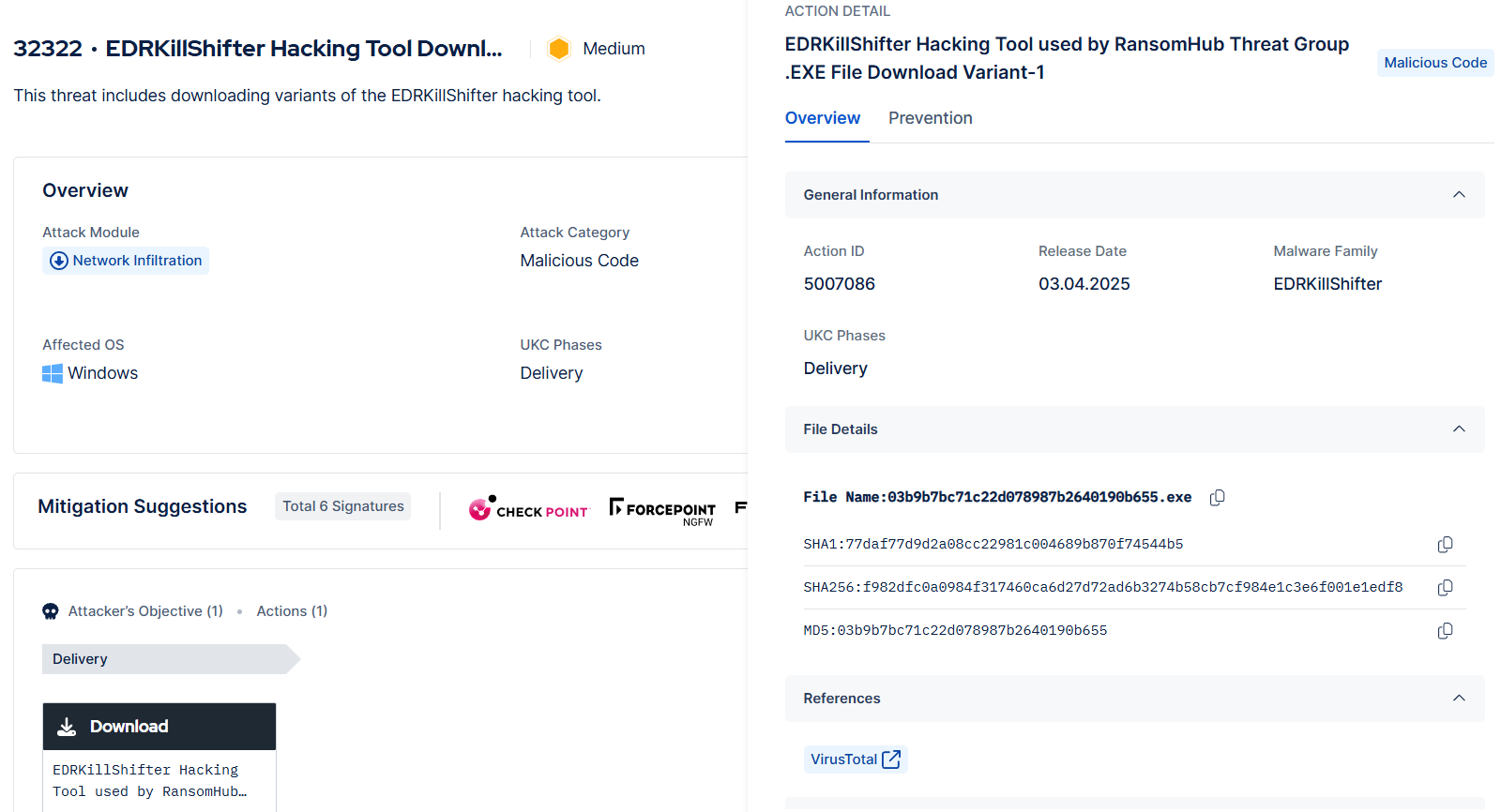
Threat for the EDRKillShifter tool in Picus Threat Library
Furthermore, Picus simulates the associated driver-loading mechanisms to provide a comprehensive security control validation.
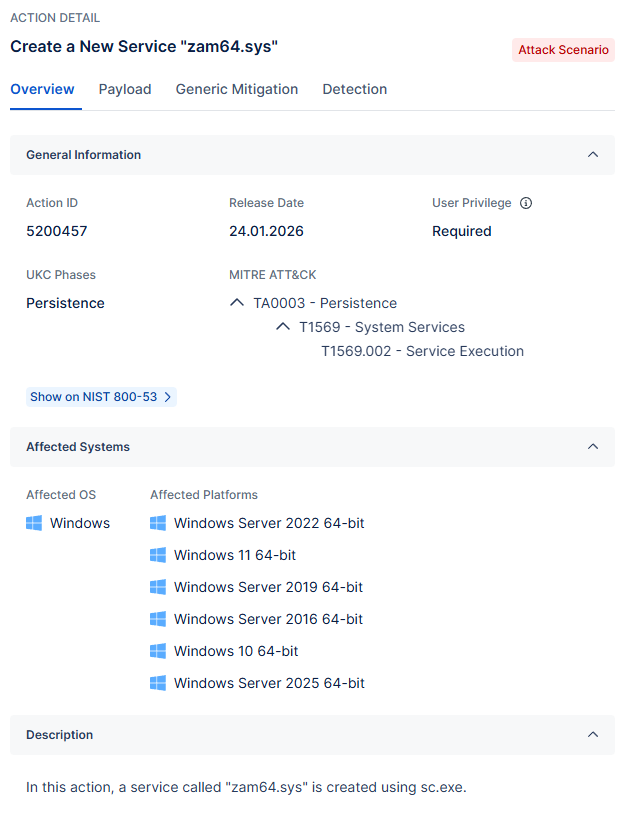
Action for simulating driver-loading mechanisms
Start simulating emerging threats today and get actionable mitigation insights with a 14-day free trial of the Picus Security Validation Platform.
Key Takeaways
- BYOVD is a Windows kernel exploitation technique where attackers load a legitimate, digitally signed but vulnerable driver to gain Ring 0 (kernel-level) access.
- Once kernel access is achieved, attackers can disable EDR, tamper with security callbacks, terminate antivirus processes, and bypass endpoint protections.
- BYOVD is not an initial access technique; it requires existing administrative privileges.
- The technique maps to MITRE ATT&CK T1068 (Exploitation for Privilege Escalation) and commonly overlaps with T1562.001 (Impair Defenses: Disable or Modify Tools).
- Attackers exploit weaknesses in Windows’ driver trust and digital signature enforcement model, including legacy signed drivers and blocklist gaps.
- Effective defense requires layered controls, including:
- Hypervisor-protected Code Integrity (HVCI)
- Monitoring driver load events (e.g., Sysmon Event ID 6)
- Privileged access hardening
- Organizations should not assume protection is working. They must continuously validate security controls against real-world attack techniques like BYOVD.
- Security Control Validation, powered by Breach and Attack Simulation, enables teams to safely test prevention and detection controls, identify gaps, and apply actionable mitigation guidance before attackers exploit them.
References
[1] “Ransomware Actor Abuses Genshin Impact Anti-Cheat Driver to Kill Antivirus,” Trend Micro. Accessed: Feb. 17, 2026. [Online]. Available: https://www.trendmicro.com/en_us/research/22/h/ransomware-actor-abuses-genshin-impact-anti-cheat-driver-to-kill-antivirus.html