.svg)



.svg)


Your antivirus flagged nothing. Your endpoint agent reported no suspicious files. And yet, attackers spent weeks inside your network, stealing credentials and exfiltrating data.
That's the reality of fileless malware. It doesn't drop executables to disk. It doesn't trigger signature-based scans. It lives entirely in memory, using the same tools your IT team relies on every day without getting caught. And the threat is accelerating. The Picus Blue Report 2025 found that while 54% of attacker activity gets logged, only 14% generates an actual alert.
The gap between what's happening and what your tools catch is real. Understanding how fileless malware works is the first step to closing it.
What Is Fileless Malware?
Fileless malware is a class of attack that executes entirely in memory using native, trusted tools already built into your operating system. It doesn't write an executable to disk. It doesn't drop a payload that your antivirus can scan. Instead, it hijacks legitimate programs like PowerShell, WMI, or the Windows registry to carry out its objectives while looking like normal system activity.
This approach is called living off the land (LotL), and it's effective precisely because defenders have built their detection strategies around looking for things that aren't supposed to be there. When attackers use tools that are always there, those detections go blind.
Common Fileless Malware Techniques
Fileless attacks aren't one thing. They're a family of techniques that share one key trait: avoiding the file system. Here are the four most common approaches attackers use today.
Registry resident malware
Registry-based fileless malware stores its payload inside Windows Registry keys rather than on the file system. A small script or loader is written to the registry, and a legitimate Windows process, such as regsvr32.exe or PowerShell, is triggered to execute it at startup or login.
This technique achieves persistence without creating any files on disk. The DarkWatchman malware, for example, used Windows Registry fileless storage to store keylogger data, keeping its footprint entirely out of the file system [1]. Because the registry is a trusted system component, many security tools don't scrutinize it closely enough to catch encoded payloads hiding inside it.
Memory-only malware
Memory-only malware loads and executes entirely within RAM, leaving no persistent artifacts on disk. Techniques like process injection, reflective DLL loading, and process hollowing let attackers inject malicious code into the memory space of legitimate processes, for example, svchost.exe or RuntimeBroker.exe.
According to the Picus Red Report 2026, process injection (MITRE ATT&CK T1055) is the single most prevalent technique observed across more than 1.1 million malware samples. Because the malicious code runs under the context of a trusted, signed process, security tools can't simply block or kill it without disrupting legitimate system operations.
WannaMine is a well-documented example: a fileless cryptomining worm that operates almost entirely in memory using PowerShell and WMI, with no files written to disk at any point in its execution.
Fileless ransomware
Fileless ransomware combines in-memory execution with encryption capabilities to deliver ransomware payloads without traditional file-based delivery. Rather than dropping a malicious binary, attackers chain together trusted system tools to disable defenses, stage their payload in memory, and encrypt victim systems before a single file alert fires.
This type of ransomware can still be seen in the wild. In ReliaQuest's 2024 Annual Threat Report, 86.2% of detections associated with critical incidents involved fileless malware, with ransomware loaders like SocGholish frequently used as the delivery vehicle [2].
Another threat that uses this type of malware is Storm-0249, a well-documented initial access broker, recently shifted to fileless PowerShell execution to facilitate ransomware attacks, using a ClickFix social engineering trick to get victims to run a curl.exe command that fetched and executed a PowerShell script entirely in memory [3].
Stages of a Fileless Malware Attack
Fileless attacks follow a clear kill chain. Understanding each stage is critical for knowing where your detection and prevention controls need to be strongest.
Stage 1: Gain access
Every fileless attack starts with initial access. The most common entry vectors are phishing emails with malicious attachments and exploitation of vulnerable public-facing services.
A user opens a malicious document, enables a macro, or visits a compromised site. A script, often PowerShell, executes in memory, establishing the attacker's foothold. From this point on, nothing touches the disk. The T1059.001 PowerShell technique is heavily favored here because PowerShell is both trusted by the OS and capable of executing complex operations entirely in memory.
Stage 2: Steal credentials
Once inside, attackers immediately target credentials. Tools like Mimikatz, loaded directly into memory, scrape NTLM hashes and plaintext passwords from the LSASS process.
With valid credentials, attackers can move laterally across the network using legitimate protocols, making their activity nearly indistinguishable from normal user behavior.
Stage 3: Maintain persistence
The challenge with memory-only malware is that it disappears on reboot. So attackers need a persistence mechanism that survives without writing executable files. Registry modifications, scheduled tasks, and WMI event subscriptions are the most common approaches.
WMI event subscriptions, for instance, can be configured to re-execute a malicious PowerShell script every time a system event fires, such as a user login or a network connection. This gives attackers persistent, fileless access even after reboots.
APT29 used exactly this technique to maintain persistent access as SYSTEM, with no artifacts outside the WMI repository [4].
Stage 4: Exfiltrate data
The final stage is getting the data out. Fileless malware uses encrypted channels, often over legitimate protocols like HTTPS, to communicate with command-and-control (C2) servers.
Data is staged in memory or in the registry and transmitted in small chunks to avoid triggering data loss prevention tools.
How to Detect Fileless Malware In Your Environment?
Detecting fileless malware requires a shift from file-based to behavior-based security. Traditional antivirus can't detect code that never exists as a file.
Here's what effective detection looks like:
- Behavioral analysis at the endpoint: EDR solutions with behavioral detection monitor process behaviors, parent-child process relationships, command-line parameters, and memory allocations. Anomalies like PowerShell spawning from a Word document, or svchost.exe making outbound network connections to unusual IPs, are key indicators.
- PowerShell and script monitoring: Because PowerShell is so heavily abused in fileless attacks, enabling PowerShell script block logging and module logging is a critical baseline control. Additionally, AMSI (Antimalware Scan Interface) integration allows security tools to inspect scripts at runtime before they execute.
- WMI and registry monitoring: Track WMI event subscriptions and registry key modifications, especially in run keys and startup locations. Unexpected entries in these locations are high-fidelity indicators of fileless persistence.
- Memory scanning: Injected code in legitimate processes can be detected through memory analysis. Look for anomalous memory allocations, unsigned code executing in signed process memory, and suspicious API call sequences.
- Network behavior analysis: Monitor for unusual encrypted outbound traffic, DNS beaconing, and connections to newly registered or low-reputation domains. Fileless attacks still need to communicate, and that communication is detectable with the right tooling.
The hard truth is that 80% of antivirus products were unable to detect fileless attacks in controlled tests [5]. Relying on any single tool is insufficient. Detection requires layered, behavioral controls across endpoint, network, and log analysis, integrated and tuned to work together.
How Picus Can Prevent Fileless Malware Attacks In Your Organization
Knowing you have gaps in your defenses is one thing. Knowing exactly which gaps exist, and what an attacker would do with them, is something else entirely.
Picus’ Security Control Validation (SCV) module, which is powered by Breach and Attack Simulation (BAS) technology, lets you simulate fileless malware attacks safely within your production environment, using the same techniques real adversaries use.
Picus Labs continuously tracks real-world fileless malware campaigns and translates them into ready-to-run simulations inside the Picus Threat Library. So you're always testing against what attackers are actually doing right now, not last year's signatures.
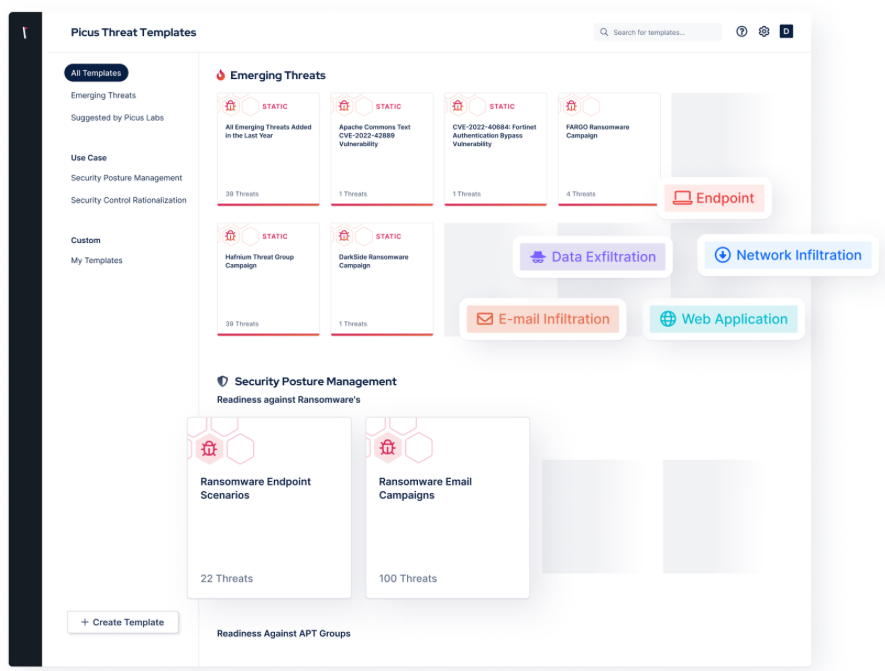
Figure 1. Picus Threat Library, Emerging Threats Templates
When a simulation reveals a gap in your security controls, you don't have to figure out the fix on your own.
The Picus Mitigation Library delivers vendor-neutral and vendor-specific, actionable guidance tailored to the security tools already in your stack. Whether your team needs a rule for your SIEM, a policy change for your EDR, or a network control adjustment, the guidance is ready to implement immediately, no manual research required.
Used together, the Threat Library and Mitigation Library power a repeating cycle: simulate attacks → identify what fails → apply the fix → simulate again. That cycle is what turns security validation from a one-time audit into an ongoing practice that keeps pace with how attackers actually operate.
Get your free demo now, find your gaps against emerging fileless malware threats, and get quick & effective fixes for your security controls.
Key Takeaways
- Fileless malware executes entirely in memory using native, trusted OS tools like PowerShell, WMI, and the Windows registry, meaning it never writes to disk and bypasses traditional signature-based antivirus detection.
- The gap between attacker activity and actual alerts is significant: while 54% of attacker activity gets logged, only 14% generates an actual alert.
- The three primary fileless attack techniques are registry-resident malware, memory-only malware, and fileless ransomware. Process injection (MITRE ATT&CK T1055) is the single most prevalent technique, observed across more than 1.1 million malware samples.
- Fileless attacks follow a four-stage kill chain: gaining initial access (commonly via phishing), stealing credentials (e.g., scraping LSASS via Mimikatz), establishing persistence (via registry modifications, scheduled tasks, or WMI event subscriptions), and exfiltrating data over encrypted channels.
- 80% of antivirus products were unable to detect fileless attacks in controlled tests, making layered, behavior-based detection across endpoint, network, and log analysis essential.
- Effective detection requires behavioral analysis at the endpoint, PowerShell/script block logging with AMSI integration, WMI and registry monitoring, memory scanning for injected code, and network behavior analysis for anomalous outbound traffic.
- Picus Security's Breach and Attack Simulation (BAS) platform enables organizations to safely simulate fileless malware attacks in production environments, mapped to MITRE ATT&CK, and pairs findings with the Picus Mitigation Library to deliver vendor-specific, actionable remediation guidance for existing security tools.
References
[1] H. C. Yuceel, “The MITRE ATT&CK T1027 Obfuscated Files or Information Technique.” Accessed: Mar. 13, 2026. [Online]. Available: https://www.picussecurity.com/resource/the-mitre-attck-t1027-obfuscated-files-or-information-technique
[2] E. Blogs, “Living off the Land and Fileless Malware,” ReliaQuest. Accessed: Mar. 13, 2026. [Online]. Available: https://reliaquest.com/blog/living-off-the-land-fileless-malware/
[3] The Hacker News, “Storm-0249 Escalates Ransomware Attacks with ClickFix, Fileless PowerShell, and DLL Sideloading,” The Hacker News. Accessed: Mar. 13, 2026. [Online]. Available: http://thehackernews.com/2025/12/storm-0249-escalates-ransomware-attacks.html
[4] L. Cardiet, “Fileless malware explained: how attackers operate without files and how to stop them.” Accessed: Mar. 13, 2026. [Online]. Available: https://www.vectra.ai/topics/fileless-malware
[5] “A survey on the evolution of fileless attacks and detection techniques,” Computers & Security, vol. 137, p. 103653, Feb. 2024, doi: 10.1016/j.cose.2023.103653.