A YARA rule is a pattern-matching definition used by malware analysts and detection engineers to identify files belonging to a specific malware family or exhibiting specific suspicious traits, based on text strings, byte sequences, or boolean conditions. Each rule contains a name, an optional metadata block, a strings section that defines the patterns to match, and a condition section that specifies which combination of those patterns constitutes a hit — making YARA the de facto standard for static file classification in malware research, threat intelligence, and incident response.
Key Takeaways
- YARA rules use pattern matching to detect and classify malware across files, memory, and backup data.
- YARA strengthens backup and recovery workflows by ensuring restored data is free from hidden ransomware or malicious artifacts.
- YARA supports multiple use cases, including malware detection, file-type identification, threat hunting, and incident response.
The Six Core Components of YARA Rules
Writing YARA rules uses the rule identifier : tags { ... } structure with these core components:
- Rule Name: Unique identifier for the signature.
- Tags: Optional labels for grouping and filtering.
- Meta: Optional but recommended context fields (author, description, references).
- Strings: Text, hex, or regex patterns that define what the rule searches for.
- Condition: Mandatory Boolean logic that determines a match.
- Import Statements: Optional modules loaded before any rule for extended analysis (PE, ELF, hash, etc.).
These elements form a compact, expressive language for describing malware traits with precision.
Below is an example of YARA rules created for the ESXi variant of Play ransomware. To walk through the YARA structure and syntax, we will take a closer look at this real-world example referenced in the updated CISA AA23-352A advisory from June 2025.
YARA Rules Examples: The ESXi Variant of Play Ransomware (June 2025, CISA update)
The ESXi variant of Play ransomware uses hypervisor-specific shell commands to shut down virtual machines, enumerate datastore contents, and modify the ESXi interface to display its ransom note.
This YARA rule identifies the ESXi-focused Play binary by matching its distinct operational strings, targeted VM file extensions, and characteristic ESXi management commands.
|
rule PlayForESXi |
Let’s start with explaining the rule name body.
Rule Name
The rule name is the primary identifier that appears immediately after the rule keyword. It is the handle YARA uses when compiling rules, executing scans, generating logs, and debugging results. A clear and descriptive rule name improves maintainability and makes the rule easier to reference in detection workflows, threat hunting, and DFIR operations.
A rule name must:
- Be unique within the rule file
- Start with a letter or underscore
- Contain only letters, numbers, and underscores
- Not include spaces or special characters
Examples of valid rule names;
|
rule RansomwareDetection |
In our example, the name of the YARA rule is “PlayForESXi”.
|
rule PlayForESXi |
This name clearly indicates the rule’s purpose: detecting the PLAY ransomware variant targeting VMware ESXi systems.
Rule Tags
Tags in a YARA rule are optional labels placed after the rule name. They act as classifiers that help you group, filter, and organize rules without affecting how the rule matches. Tags do not influence detection logic; they simply provide a way to categorize rules for operational use.
Purpose of tags:
- Group rules by malware family, platform, or behavior
- Filter which rules to run (yara -t <tag>)
- Improve rule organization in large rule sets
- Support tooling that sorts or displays rules based on tags
Here is an example syntax.
|
rule PlayForESXi : ransomware esxi play { |
For instance, if we were to run only rules tagged for ransomware analysis, we would run the following command.
|
yara -t ransomware rules.yar /path/to/files |
Or, run only YARA rules tagged play;
|
yara -t play rules.yar /path/to/files |
This is extremely useful when you have large rule sets and want to run only a subset, such as ESXi ransomware rules, Linux ransomware rules, or rules for a specific threat family.
Metadata
The metadata section in a YARA rule (meta:) provides descriptive information about the rule. It does not influence detection logic. Its purpose is to give context for analysts, documentation systems, and automated tools.
What metadata usually includes;
- author → Who wrote the rule
- description → What the rule detects (best practice: start with “Detects …”)
- date → Creation or update date (YYYY-MM or YYYY-MM-DD)
- malware family / threat type → e.g., ransomware, stealer, trojan
- references → Related reports, advisories, research URLs
- version → Rule version number
- severity or confidence ratings
- MITRE ATT&CK mappings
- false-positive notes or usage guidance
These fields support rule management, threat hunting workflows, and knowledge organization.
Example metadata block;
|
meta: description = "Detects PLAY ransomware targeting ESXi Hypervisors" date = "2025-01" filetype = "elf" maltype = "ransomware" |
What each one represents:
- description → Human-readable summary of the detection goal.
- date → When the rule was created or last edited.
- filetype → Expected file format (here, ELF binaries on ESXi).
- maltype → High-level category of the threat (ransomware).
Strings
Strings are the core detection elements used to match patterns inside files, memory, or data streams. They represent observable artifacts of malware: text, byte sequences, or behavior signatures. Each string is assigned an identifier (e.g., $s1) and is later referenced in the condition section to determine when a rule should trigger.
Strings can be text, hexadecimal byte patterns, or regular expressions.
YARA evaluates these patterns efficiently using the Aho–Corasick algorithm for multi-string scanning.
Types of Strings in YARA
|
String Type |
Example |
Purpose / Typical Use Cases |
|
Text |
$s = "encrypt:" nocase |
Matches readable text in ASCII or UTF-16; used for malware keywords, commands, URLs, config markers, mutex names, strings seen in plaintext or debug output. Works with modifiers like nocase, wide, fullword. |
|
Hex |
$h = { E8 ?? ?? ?? ?? 83 C4 } |
Matches raw bytes, opcodes, binary signatures, shellcode, PE/ELF headers, unpacker stubs. Supports wildcards, byte-range “jumps”, and alternatives to tolerate minor differences across variants. Very useful when malware is obfuscated or binary-only. |
|
Regex |
$r = /[A-Za-z0-9]{32}/ or /cmd\.exe/i |
Matches variable or partially obfuscated patterns: hashes, encoded strings, dynamic URLs, variable file paths, config lines. Allows flexible detection when exact text or byte patterns are too brittle. Supports regex modifiers like nocase, ascii, wide, fullword (also regex-specific flags). |
The string block in our YARA rule example;
In our example, the strings section appears between strings: and condition:.
Each string defines an artifact commonly observed in Play ransomware activity on ESXi environments. These artifacts include status messages printed by the ransomware, ESXi-specific filesystem paths, virtual-machine file extensions, and shell commands issued during the attack.
|
strings: |
What they represent:
Ransomware execution messages
"encrypt:", "First step is done.", "Complete." → messages logged during encryption, useful for identifying Play’s workflow.
ESXi filesystem and entropy sources
Paths such as "/vmfs/volumes" and "/dev/urandom" indicate interactions with ESXi storage locations and pseudo-random generation.
Targeted virtual machine file extensions
The list of .vmdk, .vmx, .vswp, .nvram, etc. reflects Play ransomware’s focus on core VMware VM artifacts that must be encrypted or disrupted.
ESXi shell commands used during attacks
Strings such as vim-cmd vmsvc/power.off and esxcli storage filesystem list match operational steps Play performs:
- powering off VMs before encryption
- enumerating storage
- gathering VM inventory
Campaign-specific ransomware extension
The .PLAY extension is a direct indicator of Play ransomware activity.
Conditions
The condition section defines the logical expression that determines when the rule matches a file, process, memory region, or data stream.
It is the mandatory part of a rule, without a valid condition:, the rule cannot run.
The condition can check for things like;
|
Element |
What It Does |
|
Boolean operators (and, or, not) |
Combine multiple conditions logically (all must match, any, or negate) |
|
String references; $string_name, or counting: #string_name |
$string_name: true if the pattern appears at least once. #string_name: returns the number of matches, useful for hit-count based logic. |
|
File properties / Metadata checks (e.g. filesize, header checks) |
Enables context-aware logic: skip too small files, check file type (PE, ELF, etc.), or limit by size to reduce false positives. |
|
Positional / offset operators; at, in |
Force patterns to appear at specific offsets (e.g. header at 0) or within defined byte ranges, useful for structural checks. |
|
Arithmetic / relational expressions (==, >, <, >=, <=, mathematical operators) |
Combine counts or file property values to create thresholds or ratios (e.g. “if string appears > N times” or “if size < X”). condition: $PLAY_ext_str and filesize < 300KB |
|
Grouping / nested logic / “any of” / “all of” shorthand |
Build complex detection logic combining many indicators, e.g. require one of several suspicious strings and a certain file size and structural header checks. |
Here is another YARA rule example.
The condition triggers only if the file is a valid BEAM binary under 1MB, contains the ssh_connection.erl reference, and does not contain any of the fix-related strings.
In short: it matches vulnerable Erlang/OTP SSH modules and excludes patched ones.
|
rule VULN_Erlang_OTP_SSH_CVE_2025_32433_Apr25 { |
In our example, the condition section is rather simple.
|
condition: |
"all of them" is a YARA shorthand that refers to every string defined in the strings: block. For this rule to trigger, every one of those patterns must be present in the scanned file.
This creates a highly specific match requirement, ensuring the rule only detects files that exhibit the full set of indicators associated with Play ransomware on ESXi systems.
Import Statements
Import statements allow a rule to load additional modules that extend YARA’s core functionality. These modules provide specialized functions, constants, and file-format metadata that cannot be accessed through basic strings or hex patterns alone.
Here is an example.
|
import "pe" |
Here, import "pe" brings in the PE module.
In the condition, pe.is_pe checks that the file is a valid Portable Executable.
pe.number_of_sections > 10 lets the rule flag binaries with more than 10 sections, which might be a suspicious packing or obfuscation.
Use Cases for YARA
YARA Rules for Malware Detection
- YARA is widely used as a pattern-matching tool that allows analysts to identify known malware (malicious binaries, scripts, or memory dumps) by matching strings or byte patterns.
- Many security teams embed YARA rules in incident-response workflows, enabling quick scanning of suspicious files, memory dumps, or even backup snapshots to catch malware early before it executes or spreads.
- Because YARA supports both textual and binary patterns, and can combine multiple criteria (file header, strings, regex, hex patterns), it adapts well to both simple malware and more complex or obfuscated threats.
Here is an example.
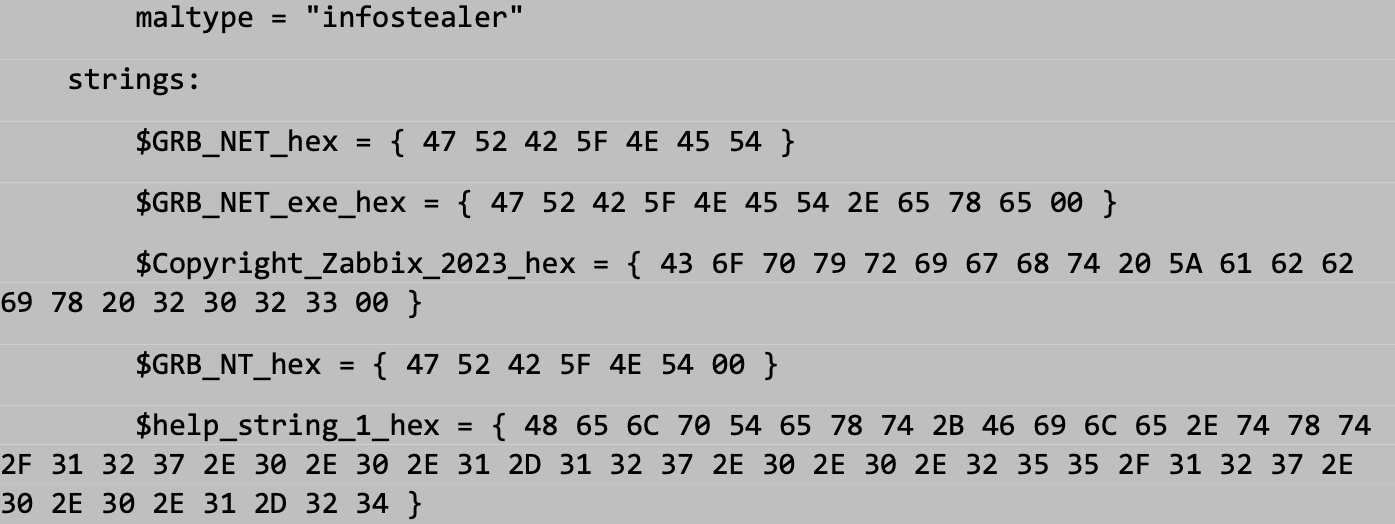
Figure 1. YARA and Suricata Rules to Detect the Infostealer GRXBA Version 1.1.3.0, CISA AA23-352A
Signature-based YARA
- In many cases, YARA is used to create signature-based rules: e.g. snapshots of known malicious files, unique byte patterns, or characteristic strings. These rules are fast, precise, and effective against threats already analysed.
- This “classic” mode is especially useful for known malware families or previously seen samples, quickly flagging known bad artifacts in large collections of binaries, backups or incoming files.
YARA Rules for File Type
- YARA rules are not limited to malicious code detection: it can be used to classify and filter files by type or extension (e.g. .pdf, .exe, .doc, etc.), or by structural characteristics (e.g. ELF header, ZIP structure, PDF header).
- For instance, here is an example for identifying ZIP-Based Formats (ZIP, DOCX, XLSX, APK, etc.) Many file types, including Office documents, APKs, and JARs, are actually ZIP archives internally.
|
rule Identify_ZIP_Structure |
This YARA rule detects ZIP files, even if renamed, or ZIP-based formats like DOCX or APK.
- That makes YARA useful for more general tasks: inventorying file types, verifying file integrity, detecting suspicious file clusters (e.g. lots of executables arriving in a folder), or filtering out irrelevant files before deeper analysis.
YARA Rules and Threat Intelligence
- Organizations (or vendors) often curate YARA rules from community or internal malware research, embedding them into threat-intelligence programs to detect known or emerging threats across environments.
- This constant updating helps maintain resilience: as attackers evolve tactics (packing, obfuscation, novel loaders), defenders can adapt by refining or expanding the YARA rule set.
Example Workflow Looks Like (YARA + Threat Intel) for SOC Teams
Here’s a simplified workflow, based on how YARA repos and vendors operate.
- A research team (or vendor) obtains malware samples, perhaps new ransomware, trojan, or stealthy loader.
- They analyze the malware (static analysis, dynamic analysis, unpacking, reverse-engineering, etc.) to extract distinguishing patterns: strings, byte sequences, configuration artifacts, suspicious headers, or behavioral indicators.
- They encode those indicators into a YARA rule: name, metadata (e.g. malware family name, author, date, confidence), strings (text or hex), and condition logic.
- They publish the rule, either publicly (on GitHub, threat-intel feeds) or privately (internal CTI repo).
- Example; the public repository InQuest YARA Rules Repository collects YARA rules from many malware researchers and makes them available for broad use (malware detection, threat hunting etc.).
- Other organizations consume that rule set: integrate into file-scanning, EDR, backup-scanning, threat-hunting, or forensic pipelines.
- As threats evolve (e.g. new variants, obfuscation, packing), the research teams refine or expand the YARA rules. Updated rule-sets are shared again, enabling defenders to stay current.
- This collaborative sharing and updating is a core element of what we call “threat intelligence”, leveraging community or vendor research to benefit many organizations.
Ransomware Detection with YARA Rules
- Given the ever-present threat of ransomware, YARA is often used to detect ransomware payloads (encryptors, droppers, ransomware-specific tools), especially pre-execution or during file-scanning phases.
- Additionally, YARA-based detection complements other approaches (backups, behavioral detection, network monitoring), forming part of a layered defense especially useful when ransomware authors change filenames or packers to evade traditional antivirus signatures.
What Makes a “Good” YARA Rule
A high-quality YARA rule should:
- Detect not just a single file, but a malware family or class (i.e. variants with similar traits) rather than a single sample.
- Be specific enough to avoid matching benign files, but general enough to catch slightly modified or new variants.
- Be efficient and performant, avoid overly broad or expensive operations which slow scanning at scale.
- Be readable and maintainable so other analysts (or your future self) can understand what the rule is doing and why.
Top Six Best Practices for Writing Effective YARA Rules
Here are concrete practices many in the community follow when authoring YARA rules.
Use clear naming and metadata
- Employ a consistent naming convention. It’s recommended that rule names encode meaningful information, e.g. threat family, file type, detection context.
- Include a meta section with fields such as description, author, date, maybe reference or tags, to document what the rule is for, when it was written, and by whom.
- Use inline comments (e.g. with //) where helpful, so that non-trivial strings or hex patterns are explained.
Pick high-quality, malware-specific strings/patterns
- Focus on strings or byte-patterns unique to the malware, avoid generic strings that may appear in benign files.
- Use a combination of string types (ASCII, Unicode, hex, regex) if necessary, mixing helps resilience against simple modifications.
- Where possible, use binary patterns or file-magic + header checks (e.g. PE header, file-type magic) rather than just textual strings, this makes detection more robust to obfuscation or simple string changes.
Build balanced, precise conditions
- Avoid overly broad or fuzzy conditions (wildcard-heavy regex, etc.), these often lead to high false-positive rates.
- Where appropriate, restrict by filesize, file type (magic header), or other metadata, to exclude unlikely matches.
- Use logical combinations (e.g. requiring several independent indicators together) rather than a single “match anything” condition. This reduces risk of accidental hits on benign files.
Test thoroughly (malicious + benign samples)
- Always validate new rules against a wide set of benign files (legitimate executables, documents etc.) and malicious samples, to check both false positives and detection coverage.
- If possible, test in a lab environment, sandbox, or as part of your automated scanning system before deploying to production, especially if rule uses more unusual patterns or binary signatures.
Organize rules and maintain them like code
- Maintain a repository or library of rules (e.g. in Git), with versioning, change history, and documentation. This helps track which rules detect what, when they were updated, and why.
- Use consistent templates or skeletons when creating new rules (metadata → strings → condition) to keep structure uniform across your rule-set.
- Document assumptions, coverage, limitations, and the reasoning behind choices (why these strings, why these conditions), helpful for future tuning or review.
Stay aware of limitations & update rules as threats evolve
- Understand that simple string-based rules may fail against obfuscated, packed, or polymorphic malware; where possible rely on more robust indicators (binary patterns, file-structure checks)
- For malware families actively evolving, revisit and update rules periodically, or build modular rules that can be easily extended.
- Avoid overfitting a rule to a single sample, aim instead for broader “family-level” detection to maintain usefulness across variants.
Examples: Why GoodPractices Matter in Writing a YARA Rule (real-world reasoning)
- Weak strings create noise; strong strings reduce false positives
A naive YARA rule might rely on a generic string such as "config" or "password". These strings appear in thousands of legitimate binaries, Office documents, browser caches, and configuration utilities. In a production SOC environment, such a rule would trigger constantly and provide no actionable value.
A stronger YARA rule uses malware-specific indicators, for example:
- A unique configuration marker found in Phobos ransomware samples such as "ph0b0s_cfg_v3"
- A code stub used by many LokiBot variants: { 8B 45 F8 83 C0 10 8B 55 FC }
- A file-structure check like a Windows PE header ("MZ" at offset 0) or an ELF header (7F 45 4C 46)
A rule that combines something unique (e.g., "ph0b0s_cfg_v3") plus a magic header check avoids scanning text files, ZIP archives, and other benign content.
This dramatically reduces false positives while preserving detection across Phobos variants that reuse the same config layout.
- Single-sample rules break easily; multi-indicator rules are resilient
A rule built by hashing one malware sample or matching a single string (e.g., "BuildID:20220911") will break the moment the attacker:
- recompiles the malware
- changes a version string
- uses a different compiler, packer, or loader
- encrypts or obfuscates the payload
Real attackers regularly change such indicators.
A resilient rule uses structural or behavioral markers that persist across variants, for example:
- Import functions required for ransomware encryption routines, such as:
- CryptAcquireContextA
- CryptEncrypt
- GetLogicalDrives
- Embedded ransom note templates containing predictable markers (e.g., "Your files have been encrypted" with unique phrasing)
- Unique instruction sequences that remain after recompilation, such as a crypto loop prologue found in several MedusaLocker samples.
Combining these creates a signature that continues to match new variants as long as they maintain the same logical workflow, even if strings or superficial features change.
- Rule documentation and versioning ensure long-term detection quality
In a large SOC or MDR environment, hundreds of YARA rules may be deployed across:
- endpoint scanners
- sandbox analysis pipelines
- restore-point scanning tools
- threat-hunting platforms
- S3 or blob-storage scanning systems
Without proper metadata and versioning, analysts cannot tell:
- Which malware family a rule targets
- Whether the rule is stable or experimental
- When it was last validated
- What coverage it provides against current variants
Example: A rule written in 2021 for TrickBot loaders might rely on old string artifacts like "clientID="? or "systeminfo.exe"execution chains. But TrickBot evolved dramatically in 2024–2025, changing config structures and infection flow.
If a SOC has versioned rules, documentation, and a change history, analysts can:
- update the rule to include new TrickBot loader patterns
- mark the older version as deprecated
- track which detections were influenced by which rule version
- share updates across detection engineering teams
This prevents stale or broken rules from silently reducing visibility.
Yara Rules vs. Sigma Rules: Key Differences
|
Aspect |
YARA Rules |
Sigma Rules |
|
Primary Focus |
Static or memory-based pattern matching, identifying malicious files, malware, unwanted binaries or suspicious artifacts on disk or in memory. |
Log-based event detection, identifying suspicious behavior by analyzing system, application, or network logs. |
|
What they Detect |
File content (binaries, documents), memory dumps, file structure (headers, byte sequences, strings, etc.) |
Events/activities recorded in logs, e.g. process creation, login attempts, user activity, network events, command executions. |
|
Rule Format |
Custom rule language with C-like syntax: define strings / hex-patterns / regex / module imports (PE, ELF, etc.), and Boolean conditions. |
YAML-based format. Rules consist of metadata (title, id, description, tags), logsource definition, detection criteria (field conditions), and condition logic. |
|
Typical Use Scenarios |
Malware analysis, forensic investigation, threat-hunting on file systems or backups, scanning unknown binaries for malicious patterns, classification of malware families, cleaning malware from backups before restore. |
Detecting suspicious or malicious behaviors, brute-force attempts, anomalous user activities, lateral movements, privilege misuse, across systems that produce logs (endpoints, servers, network devices, etc.). |
|
Strengths |
Very precise detection based on file/memory content. Detects malicious files even before execution. Good for polymorphic malware if rule authors use robust patterns (byte-sequences, headers, structure) rather than superficial strings. | SIEM-agnostic: same rule works across different log-management or SIEM platforms. Well suited for behavior-based detection (when malicious activity happens, not just file presence).Works across diversified log sources (endpoints, network devices, auth servers, etc.), providing broad coverage. |
|
Limitations |
If malware is packed, encrypted, obfuscated, or heavily polymorphic, static pattern-matching may fail. Only sees the file or memory: no context of behavior (network activity, process execution, user actions). Requires file to be present or loaded, cannot detect threats solely via logs or network events. |
Relies on sufficient logging, if events are not logged, Sigma rules cannot detect anything. No insight into file payloads or memory content, cannot detect malicious files just by logs. Log-based detection can produce high false positives if not carefully tuned (normal admin actions may appear suspicious). |
|
Typical Deployment |
Anti-malware engines, EDR tools (file / memory scanning), backup-scan workflows (e.g. before restore), threat-hunting or forensic pipelines. |
SIEM systems, log-analysis tools, centralized logging platforms, SOC monitoring dashboards, event-correlation pipelines. |
|
Rule Sharing |
Community and vendor rule repositories, often used by malware researchers, DFIR teams; rules are portable across systems that support YARA scanning. |
Designed to be SIEM-agnostic: same Sigma rule can be converted into platform-specific queries (Splunk SPL, Elastic, Chronicle, etc.) without rewriting logic. |
|
Detection Level |
Content-based (static/memory), looks at the actual bytes, strings, structure of files or memory dumps. |
Behavior-based (event/activity), looks at what happens on the system: log events, user and process activity, network events, etc. |
YARA Rules, Documentation, and Resources
There are several well-known YARA rule repositories and communities where researchers, SOC teams, and threat analysts can publish, share, and collaborate on YARA rules:
YARA GitHub Repository: The central hub for the YARA project. This repository hosts the YARA source code, latest releases, issue tracking, and contributions from the core maintainers. It is the authoritative location for obtaining the most up-to-date YARA engine.
YARA Documentation: Hosted on ReadTheDocs, this documentation provides an in-depth reference for the YARA language, including syntax, rule structure, available modules (PE, ELF, hash, etc.), and examples used for malware classification and threat detection.
YARA Rules and Signatures Repository: Multiple open-source repositories maintain curated, community-contributed YARA rule sets. These collections aggregate signatures created by malware researchers, DFIR analysts, detection engineers, and threat intelligence practitioners. Users can download existing rules or contribute their own for broader community use.
YARA rules by ransomware group: a community of sample YARA rules specific to ransomware.
Picus Mitigation Library
The Picus Mitigation Library is a comprehensive repository of validated prevention and detection content that helps organizations strengthen and maintain their security posture.
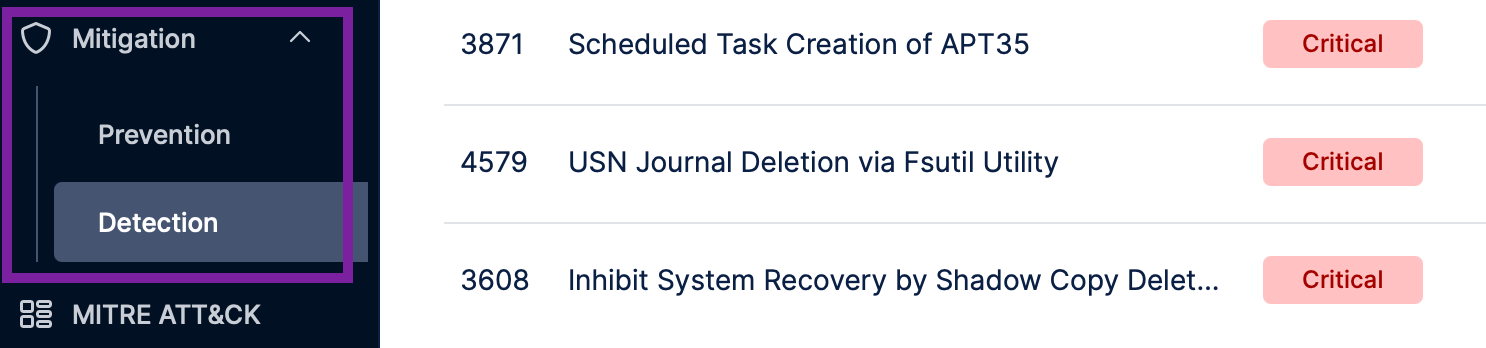
Figure 2. Picus Platform Provides Both Prevention and Detection Content
It delivers tailored mitigation coverage for a wide range of security technologies, enabling teams to close exposure gaps quickly and effectively.
The library includes:
- 80,000+ vendor-specific prevention signatures tailored for security controls such as Next-Generation Firewalls (NGFWs), Intrusion Prevention Systems (IPS), and Web Application Firewalls (WAFs).
- 4,400+ validated vendor-specific detection rules and 600+ vendor-neutral Sigma rules for major SIEM and EDR technologies to detect endpoint and network-based attacks.
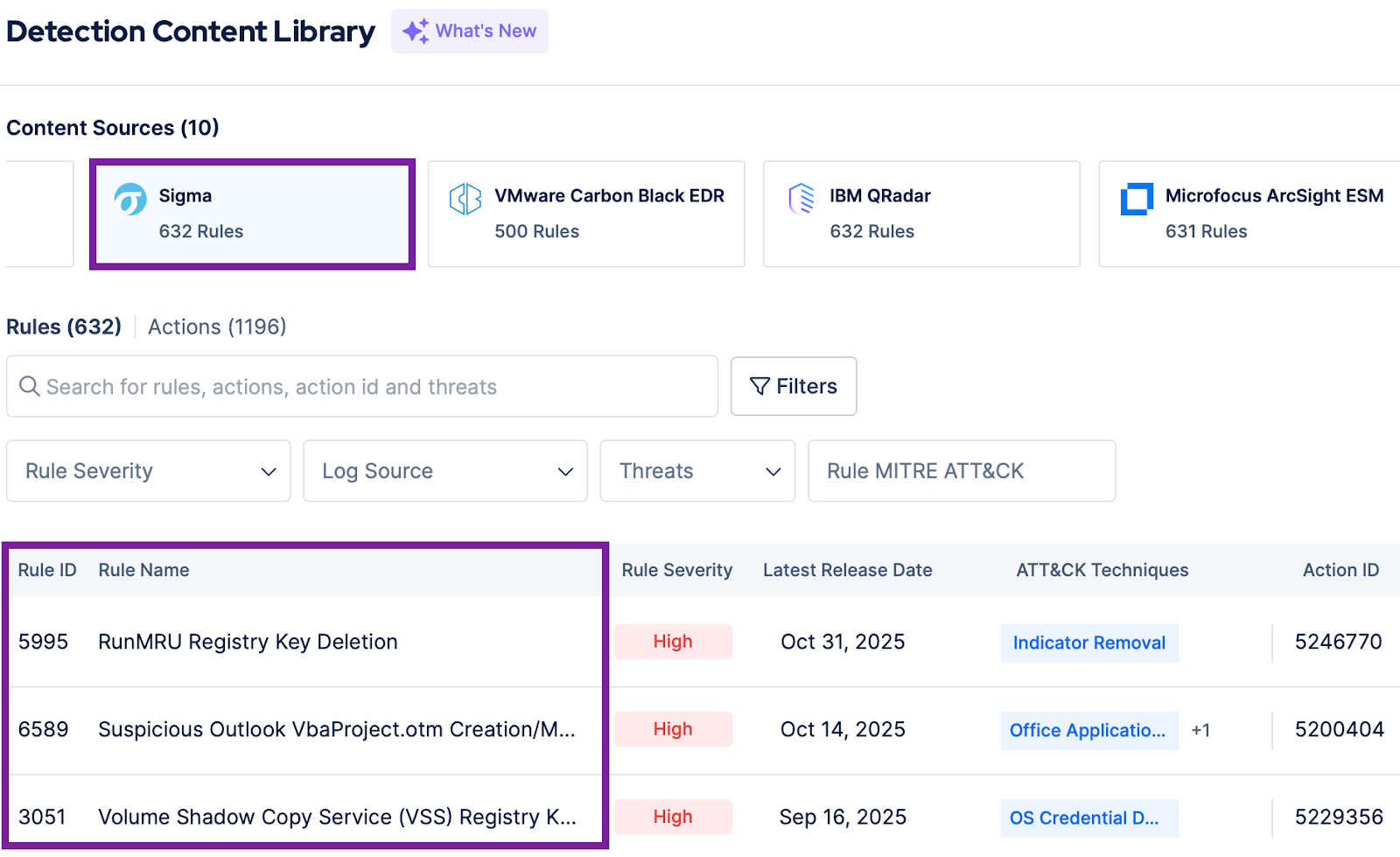
Figure 3. Picus Platform Detection Content Library
- Log source recommendations to enhance visibility, optimize SIEM performance, and strengthen detection coverage across the environment.
Ready to put your defenses to the test and apply real-world mitigation?
Start your demo now to simulate attack scenarios, validate which controls stop threats, and instantly apply tailored mitigation suggestions through the Picus Platform.


-3.png?width=353&height=200&name=image%20(79)-3.png)
.png?width=353&height=200&name=what-is-exposure-assessment-blog-preview%20(1).png)