During my security research at Picus Security, I discovered a race condition in the WordPress core updater that can allow an unauthenticated attacker to replace a site’s live wp-config.php during a core update. The vulnerability is tracked as CVE-2026-119977 (CVSS 8.1) and was fixed in WordPress 7.1.4. On November 3, 2026, CISA added it to its Known Exploited Vulnerabilities (KEV) catalog, confirming that it is being actively exploited in the wild.
By winning this race window, an attacker can create a malicious wp-config.php inside the temporary update directory and have the updater copy it over the live configuration. The replacement file can redirect the site to an attacker-controlled empty database, causing WordPress to expose its installation workflow. The attacker can then create the first administrator account and, on a typical single-site installation, upload a malicious plugin to execute arbitrary PHP code on the server.
In the following sections, I will explain how the vulnerability works in more detail.
How CVE-2026-119977 Works: A Race Condition in the WordPress Core Updater
WordPress performs a full core update using a workflow resembling the following:
|
Download the core package ↓ Extract it below wp-content/upgrade ↓ Verify known package files (unexpected files are not rejected) ↓ Copy the extracted distribution over the live site ↓ Delete the temporary working directory |
The problem occurs between extraction and copying.
A sufficiently complete core package contains files such as:
|
wordpress/wp-admin/setup-config.php wordpress/wp-config-sample.php wordpress/wp-settings.php |
WordPress extracts these files under a path like this:
|
wp-content/upgrade/<package-name>/wordpress/ |
The extraction path is created by WP_Upgrader::unpack_package() in wp-admin/includes/class-wp-upgrader.php:
|
On a typical installation, wp-content is below the public document root and PHP files inside it are executable. The extracted tree is therefore a second, temporarily accessible WordPress installation.
When the temporary setup-config.php runs, it treats the temporary wordpress directory as its WordPress root. A typical directory layout looks like this:
|
/var/www/html/ ├── wp-config.php ← live configuration └── wp-content/upgrade/<package-name>/ └── wordpress/ ← temporary WordPress root ├── wp-settings.php └── wp-admin/setup-config.php ← temporary installer |
The temporary installer (setup-config.php) checks only these two locations for an existing configuration:
|
/var/www/html/wp-content/upgrade/<package-name>/wordpress/wp-config.php /var/www/html/wp-content/upgrade/<package-name>/wp-config.php |
This follows directly from wp-admin/setup-config.php:
|
It does not continue searching upward until it reaches /var/www/html/wp-config.php.
Therefore, even though the live site already has a configuration, the temporary installer cannot see it. Neither of the two locations it checks contains wp-config.php, so it concludes that WordPress has not yet been configured and starts the normal setup process.
The setup process does not require authentication. Therefore, an unauthenticated attacker can send requests to the temporary setup-config.php endpoint and create a new wp-config.php file in the temporary WordPress installation.
During the update window, an attacker can supply database connection parameters to the extracted installer. If the supplied database is valid and reachable, the installer constructs a configuration from wp-config-sample.php and writes it inside the extracted distribution:
|
wp-content/upgrade/<package-name>/wordpress/wp-config.php |
The database validation and file creation are also visible in wp-admin/setup-config.php:
|
define( 'DB_NAME', $dbname ); define( 'DB_USER', $uname ); define( 'DB_PASSWORD', $pwd ); define( 'DB_HOST', $dbhost );
// Re-construct $wpdb with these new values. unset( $wpdb ); require_wp_db(); $wpdb->db_connect();
if ( ! empty( $wpdb->error ) ) { wp_die( $wpdb->error->get_error_message() . $tryagain_link ); }
// ... populate $config_file from wp-config-sample.php ...
if ( file_exists( ABSPATH . 'wp-config-sample.php' ) ) { $path_to_wp_config = ABSPATH . 'wp-config.php'; } else { $path_to_wp_config = dirname( ABSPATH ) . '/wp-config.php'; }
$handle = fopen( $path_to_wp_config, 'w' ); if ( false !== $handle ) { foreach ( $config_file as $line ) { fwrite( $handle, $line ); } fclose( $handle ); } |
As the next step of the core update, WordPress recursively copies files from the extracted wordpress directory into the live installation. Before starting this operation, it constructs a skip list:
|
/* * Don't copy wp-content, we'll deal with that below. * We also copy version.php last so failed updates report their old version. */ $skip = array( 'wp-content', 'wp-includes/version.php' );
// Check to see which files don't really need updating. if ( function_exists( 'get_core_checksums' ) ) { $checksums = get_core_checksums( $wp_version, $wp_local_package ?? 'en_US' );
if ( is_array( $checksums ) ) { foreach ( $checksums as $file => $checksum ) { // ...
if ( md5_file( ABSPATH . $file ) === $checksum ) { $skip[] = $file; } else { $check_is_writable[ $file ] = ABSPATH . $file; } } } }
// ...
// Copy new versions of WP files into place. $result = copy_dir( $from . $distro, $to, $skip ); |
WordPress does not use the checksum manifest as an allowlist for the staging directory. Instead, it goes through each known core file in the manifest and checks whether the corresponding file in the live installation already matches the target version. If it matches, WordPress adds that file to $skip because it does not need to be copied again.
wp-config.php is not a core file listed in the checksum manifest, so this loop never examines it. It is also absent from the initial $skip list. As a result, the attacker-created wp-config.php remains in the staging tree and is eligible to be copied into the live installation.
Because a file with the same relative path already exists in the live installation, it is overwritten:
|
/var/www/html/wp-content/upgrade/<package-name>/wordpress/wp-config.php ↓ (overwrites) /var/www/html/wp-config.php |
After the copy completes, the live WordPress installation connects using the attacker's configuration. If that configuration points to an empty database, WordPress sees that its tables have not been created and exposes the normal installation workflow.
The attacker can then create the first administrator account in the replacement database. Where administrators can install PHP plugins, the newly created administrator can execute PHP code on the web server.
Which WordPress Sites Are Affected by CVE-2026-119977?
A WordPress site is exposed to CVE-2026-119977 when two conditions are met during a core update:
1. The Update Uses a Qualifying Core Package
The underlying updater and copy behavior affects WordPress 2.7.0 through 7.1.3.
However, not every update performed by an affected version exposes the installer. The selected package must contain setup-config.php, wp-config-sample.php, wp-settings.php, and the other WordPress core files that the temporary installer needs to initialize and run.
The WordPress core update API uses the package names full, no_content, new_bundled, partial, and rollback.
The full, no_content, and new_bundled packages contain the core installer files required for this chain.
The partial and rollback packages are version-specific delta packages, so their names alone do not guarantee a fixed set of files. A partial or rollback package exposes this chain only if that individual archive contains setup-config.php, wp-config-sample.php, wp-settings.php, and the other files required by the installer.
2. The Staging Path Is Predictable
The attacker must be able to determine the temporary staging directory path. This differs across WordPress version ranges:
- In WordPress 2.7.0 through 2.7.1, core updates use the fixed staging path wp-content/upgrade/core.
- In WordPress 2.8.0 through 4.3.35, the staging directory name is derived from the downloaded package's local filename without a random suffix.
By WordPress 4.3.35, wp_tempnam() built the local package filename from the download URL's basename without an independent random suffix:
|
The upgrader then stripped the .tmp or .zip extension and used the remaining filename as the staging-directory name in wp-admin/includes/class-wp-upgrader.php:
|
- In WordPress 4.4.0 through 5.8.18, a six-character random suffix prevents the path from being derived in this way. These versions are conditionally exploitable only if the actual path is disclosed through some other ways like verbose errors etc.
New wp_tempnam() function’s relevant part that appends six random characters:
|
As a result, a download based on wordpress-5.8.14.zip could receive a local name such as wordpress-5.8.14-aB3xY7.tmp, producing the staging directory wp-content/upgrade/wordpress-5.8.14-aB3xY7.
- In WordPress 5.9.0 through 7.1.3, package filename handling once again allows the staging path to be derived from the package filename.
WordPress 5.9.0 added support for the response's Content-Disposition filename. The current logic in wp-admin/includes/file.php sanitizes that filename and renames the random temporary file to it:
|
$content_disposition = wp_remote_retrieve_header( $response, 'Content-Disposition' ); if ( $content_disposition ) { $content_disposition = strtolower( $content_disposition ); if ( str_starts_with( $content_disposition, 'attachment; filename=' ) ) { $tmpfname_disposition = sanitize_file_name( substr( $content_disposition, 21 ) ); } else { $tmpfname_disposition = ''; } if ( $tmpfname_disposition && is_string( $tmpfname_disposition ) && ( 0 === validate_file( $tmpfname_disposition ) ) ) { // ... if ( rename( $tmpfname, $tmpfname_disposition ) ) { $tmpfname = $tmpfname_disposition; } } } |
When the package server returns a stable filename such as wordpress-7.0.3.zip, unpack_package() strips .zip and creates wp-content/upgrade/wordpress-7.0.3. This is why the staging path can once again be derived from the package filename in WordPress 5.9.0 and later.
How WordPress 7.1.4 Patched the Vulnerability
WordPress fixed this vulnerability in WordPress 7.1.4, released on October 28, 2026, and backported the fix to every maintained branch down to 4.7.
It relies on three changes:
1. Randomized Staging Directory Name
The staging directory name is no longer derived only from the package filename. A 16-character random suffix is added at the moment the working directory is created, in wp-admin/includes/class-wp-upgrader.php:
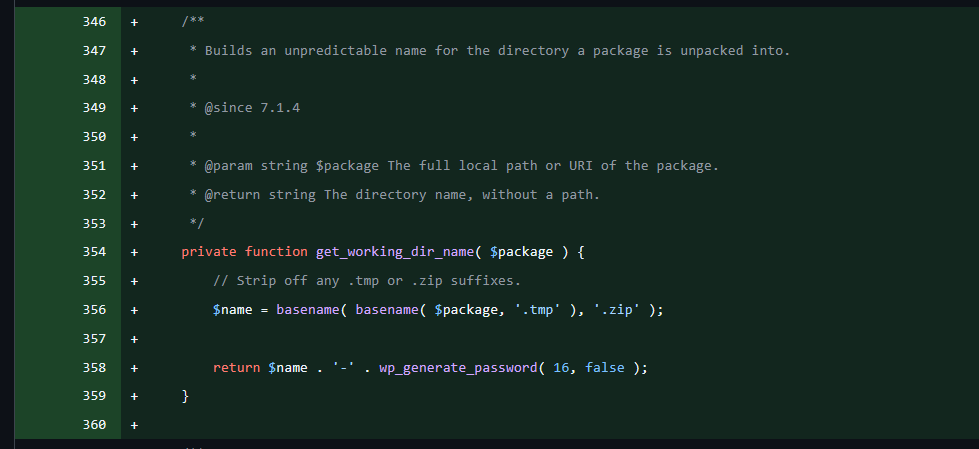
Because the randomness is now applied to the directory itself rather than the downloaded file’s name, the Content-Disposition rename introduced in 5.9.0 can no longer make the path predictable.
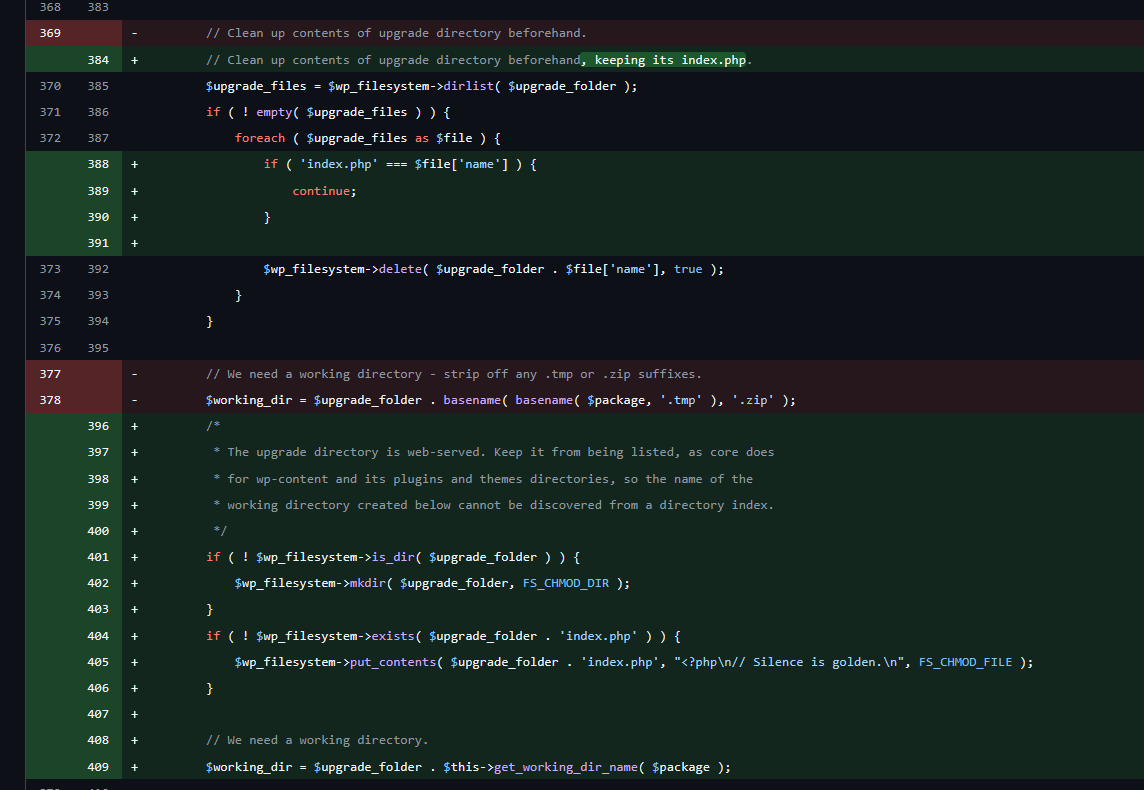
2. Preserved upgrade/index.php to Prevent Directory Listing
Previously, the pre-extraction cleanup deleted everything under wp-content/upgrade/, including index.php. On servers with directory indexing enabled, this would expose the random directory name. The cleanup now skips that file and recreates it when missing:
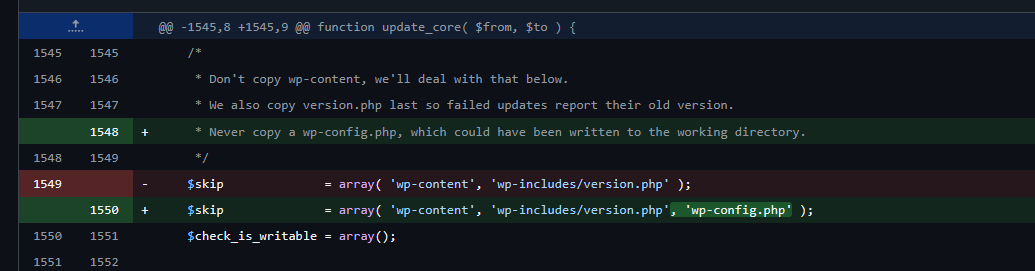
3. wp-config.php Excluded From the Core Update Copy
Finally, wp-config.php is added to the skip list in update_core() in wp-admin/includes/update-core.php, so a configuration file written into the staging tree can no longer overwrite the live one:
The First Update Is Still Exposed
The three fixes do not all protect the update that installs them. This is because a core update runs code from two different WordPress versions.
The extraction step is performed by unpack_package(), which belongs to the updater that is already installed on the site. After extraction, WordPress loads update-core.php from the new package and calls update_core() to copy the files into place.
For example, when a site running WordPress 7.0.7 updates to 7.1.4:
|
As a result, during this first update the wp-config.php skip already works, but the randomized directory name and the preserved index.php do not, because they live in the old code that performs the extraction.
The temporary installer is therefore still reachable at a predictable path. Because the new update-core.php skips wp-config.php, an attacker can no longer replace the live configuration or point the site to their own database. However, they can still set up the temporary WordPress copy with their own database, log in to it, and execute PHP code with the web server’s privileges before the staging directory is cleaned up. From there, they can still read or write files in the live WordPress directory.
This is why the first update from an unpatched release to a fixed one must be handled carefully. Only after 7.1.4 is installed do later updates use a random staging directory.
How to Remediate CVE-2026-119977 Safely
As explained in the previous section, the update that installs the fix is still performed by the old, vulnerable updater. Simply clicking Update Now on an unpatched site therefore leaves one last race window open.
The recommended target is WordPress 7.1.4. If you are staying on an older branch, update to the latest security release of that branch instead. The fix was backported to every maintained branch down to 4.7, while WordPress 2.7 through 4.6 did not receive a fix and should be upgraded to a supported version.
You can follow the two approaches below to safely update to a fixed release:
1. Block Web Access to wp-content/upgrade/
WordPress reads and writes the staging directory through the filesystem, so it never needs to serve wp-content/upgrade/ over HTTP. Denying web access to this directory makes the temporary installer unreachable, regardless of whether the staging path is predictable, and it does not break the update process.
On Nginx:
|
location ^~ /wp-content/upgrade/ { deny all; } |
On Apache, add the rule to the virtual host configuration:
|
<Directory "/var/www/html/wp-content/upgrade"> Require all denied </Directory> |
If you only have access to .htaccess, add the following line to the .htaccess file in the WordPress root, above the WordPress rewrite block:
|
RedirectMatch 403 ^/wp-content/upgrade/ |
Do not place an .htaccess file inside wp-content/upgrade/ itself. The unpatched unpack_package() deletes everything in that directory before extraction, so the file would be removed right before it is needed.
After applying the rule, confirm that a request to /wp-content/upgrade/ returns 403 before starting the update.
2. Update WordPress Manually Outside the Web Root
A manual update never extracts the package into a web-accessible directory, so no temporary installer is created at all. Download and extract the release outside the web root, then copy the core files into place while leaving wp-config.php and wp-content untouched:
|
The release package does not contain a wp-config.php, so the live configuration is not overwritten. After copying, visit /wp-admin/upgrade.php or run wp core update-db to complete any database updates. Make sure the copied files keep the correct ownership for your web server user.
Note that wp core update in WP-CLI is not a substitute for this approach. It uses the same core updater and extracts the package into wp-content/upgrade/ in the same way.
If you cannot patch immediately, validate that your security controls have the necessary prevention signatures and detection rules for CVE-2026-119977, and that they actually block requests targeting setup-config.php under wp-content/upgrade/.
How I Found CVE-2026-119977
I found this vulnerability with GPT 5.6 Sol as my research partner. The whole process took about four hours, from my first look at the WordPress core update process to a working exploit chain.
I am early in my security research career. Until recently, finding an unauthenticated RCE in software that runs roughly 40% of the web took years of experience to spot and weeks of manual review to confirm. This one had been in the core updater since WordPress 2.7, released in 2008, and survived nearly two decades of releases and reviews.
That is the lesson for security teams.
Mythos-class models put this kind of research within reach of far more people, attackers included. If an early-career researcher can find a two-decade-old RCE in an afternoon, so can an attacker.
This one has a patch now. But vulnerabilities are coming in a flood, and plenty of them may wait weeks for a fix. Even when a fix is out, anyone who runs production knows updating is rarely fast or simple. Until then, there’s a window where you’re exposed, and that’s exactly where attackers are working.
That’s why validation can’t wait for the next scheduled test anymore. It should start when something changes. A new CVE drops, an advisory comes out, someone changes a firewall rule. That’s the signal, and that’s when you need to find out whether you’re exploitable and whether your controls would actually stop it.