An automated penetration testing tool works by simulating a real attacker from an assumed breach point. It deploys on a compromised, domain-joined machine, harvests credentials, exploits live vulnerabilities, and chains techniques together to find the shortest path to domain admin, giving you proof of what an attacker could achieve, not a list of theoretical risks.
Where Does an Automated Pentest Start?
Automated pentesting operates on an assume-breach model. It starts where most security tools stop. The tool deploys from a designated Initial Access Point (IAP) of choice: a domain-joined machine running a simulated compromised user session. From that single foothold, it begins discovering hosts, users, Active Directory objects, and exploitable attack paths,
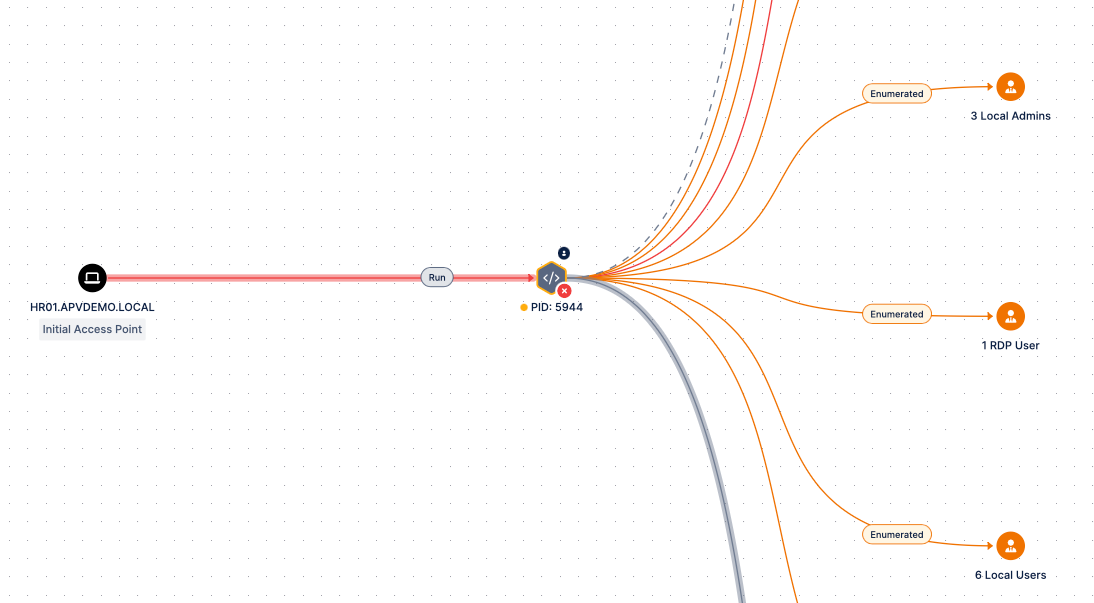
Figure 1. Automated Pentesting Tools Starts from an Initial Access Point to Mimic a Real-Life Attacker
BAS tools end when a payload detonates on your network. An automated pentest begins there.
Does an Automated Penetration Testing Tool Actually Exploit Vulnerabilities, or Just Identify Them?
An automated penetration testing tool actually exploits vulnerabilities rather than just identifying them. This is the fundamental dividing line between automated penetration testing and traditional vulnerability scanning.
A vulnerability scanner identifies theoretical weaknesses by matching service versions against a CVE database, it never attempts to execute an exploit. An automated penetration testing tool runs the actual exploit against your environment and only registers a finding when the exploit successfully works against your live configuration and controls. Every finding is confirmed by a successful compromise, giving you definitive proof of what an attacker can achieve.
How It Works
- Scan & Identify. The tool scans your environment for vulnerabilities, and this dynamically continues with an access to a new node in the AD environment.
- Attempt Exploitation. It actively tries to exploit those vulnerabilities, not just flag them.
- Proof of Exploit. When a vulnerability is successfully exploited, the tool surfaces the proof directly in the platform interface, not just a CVSS score.
- Chained Exploitation. Beyond individual CVEs, it chains techniques together , such as Kerberoasting, NTLM relay, credential harvesting, network poisoning, password cracking, and privilege escalation, all the way to the Domain Controller. This shows exactly how an adversary could navigate through your network.
One important nuance: if a vulnerability has no available exploit, or your existing security controls already block the attempt, the tool flags it but does not count it as exploitable. The result is an accurate picture of exploitable vs. theoretical risk. It is not a noisy list of every CVE found.
How Does an Automated Pentesting Tool Handle Active Directory Environments?
An automated pentesting tool treats Active Directory as the primary target. It operates under an assumed breach model. It starts from one compromised, domain-joined machine and simulates how an attacker would move laterally to reach domain admin. The tool harvests credentials, pivots between hosts via SMB or WMI, and chains AD-specific techniques like Kerberoasting and NTLM relay until it finds the shortest path to domain admin.
That's exactly what Picus Attack Path Validation does. It is built around AD from the ground up, focused on post-exploit reality: you're already in, now where can you go?
The Starting Point: Initial Access Point (IAP)
The pentest begins from a domain-joined Windows machine treated as "compromised." A stager or agent runs on this Initial Access Point, and every subsequent action unfolds from there.
How It Moves Through the Domain
The tool harvests credentials (hashes and passwords) from the IAP, then pivots to other domain-joined hosts via SMB (TCP 445/135) for PsExec-style execution, or WMI as an alternative. Each new implant beacons back to the orchestrating agent over HTTPS (TCP 443).
The logic is objective-driven, not exhaustive. If domain admin is reachable from the IAP, the tool stops there. If not, it pivots, always searching for the shortest, weakest path and pruning routes already blocked by your controls.
Attack Techniques Emulated
The tool chains real-world AD techniques mapped to MITRE ATT&CK: Kerberoasting, NTLM relay, LSA credential cache dumping, network poisoning, password cracking, misconfiguration enumeration, and privilege escalation. The same playbook a human red teamer would run, executed automatically.
Stealth Over Brute Force
Unlike traditional automated pentesting tools that blindly attack everything (and get caught by any Network Detection and Response tool), this approach is targeted and non-disruptive. Finding the path to domain admin without generating the kind of noise that triggers isolation of the attacking machine.
What Gets Blocked
Pivots fail when EDR detects the stager binary, SMB signing is properly enforced, network segmentation blocks the required ports, no valid credentials are available, or the target is unreachable. Each blocked path is recorded giving you a clear picture of which controls are actually working.
If you have any questions regarding the inner-workings of Picus’ APV product, you can read the datasheet here.
How Does Pivoting Work in an Automated Pentest?
Pivoting in an automated pentest starts from the Initial Access Point (IAP), a domain-joined Windows machine where the stager or implant first executes.
- From there, the tool harvests credentials (hashes and passwords) from the compromised host and uses them to authenticate to other domain-joined machines over SMB (TCP 445/135) for PsExec-style remote code execution, or WMI as an alternative channel.
- Once the implant lands on a new machine, it beacons back to the orchestrating agent over HTTPS (TCP 443) to receive commands and report findings, then repeats the process from the new foothold.
The logic is objective-driven, not exhaustive.
The automated penetration testing tool only pivots when it has to: if domain admin credentials are already obtainable from the IAP, it stops there. If not, it continuously searches for the shortest, weakest path to domain admin, pruning routes already blocked by EDR, SMB signing, network segmentation, or missing credentials.
Every hop is visualized on the dashboard as a graph; showing each machine traversed, the technique used at each step, and the final path to domain admin.
What Does the Output of an Automated Penetration Test Look Like?
The automated penetration test output is multi-layered, combining visual, narrative, and technical artifacts. Here is what the Picus Attack Path Validation (APV) output includes.
Attack path graph — a visual map showing every hop from the Initial Access Point to domain admin, including the technique used at each step.
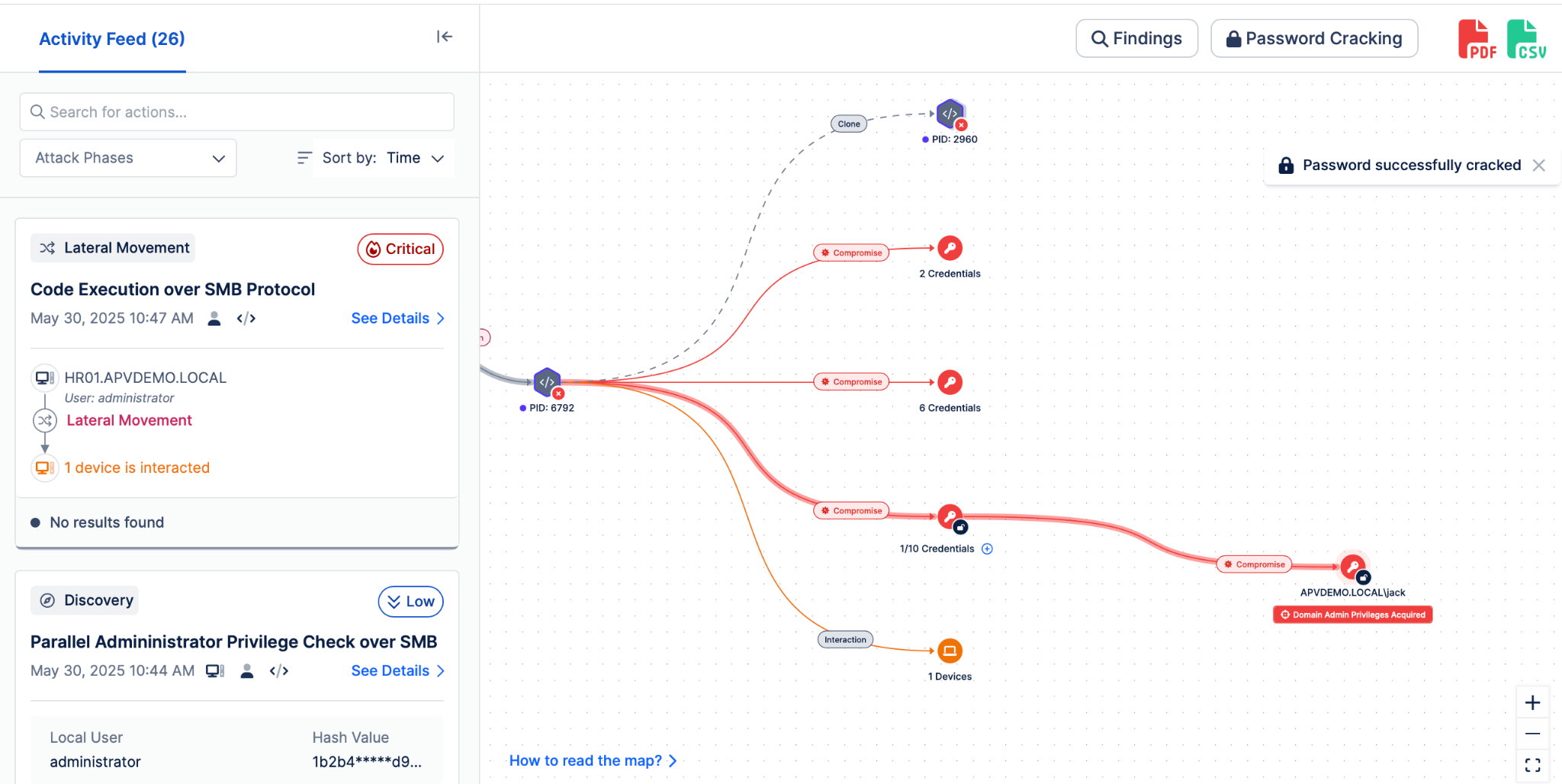
Figure 2. Real-life Attack Path Graph provided by an Picus Attack Path Validation
Pen test-style report — findings ordered by severity, proof of exploitation (e.g., LSASS dumps, harvested credentials), the shortest attack path, and a human-readable action log of what the "attacker" did.
MITRE ATT&CK & Unified Kill Chain mapping — every action tied to tactics and techniques, with timestamps for when each step happened and when (or if) it surfaced in your SIEM.
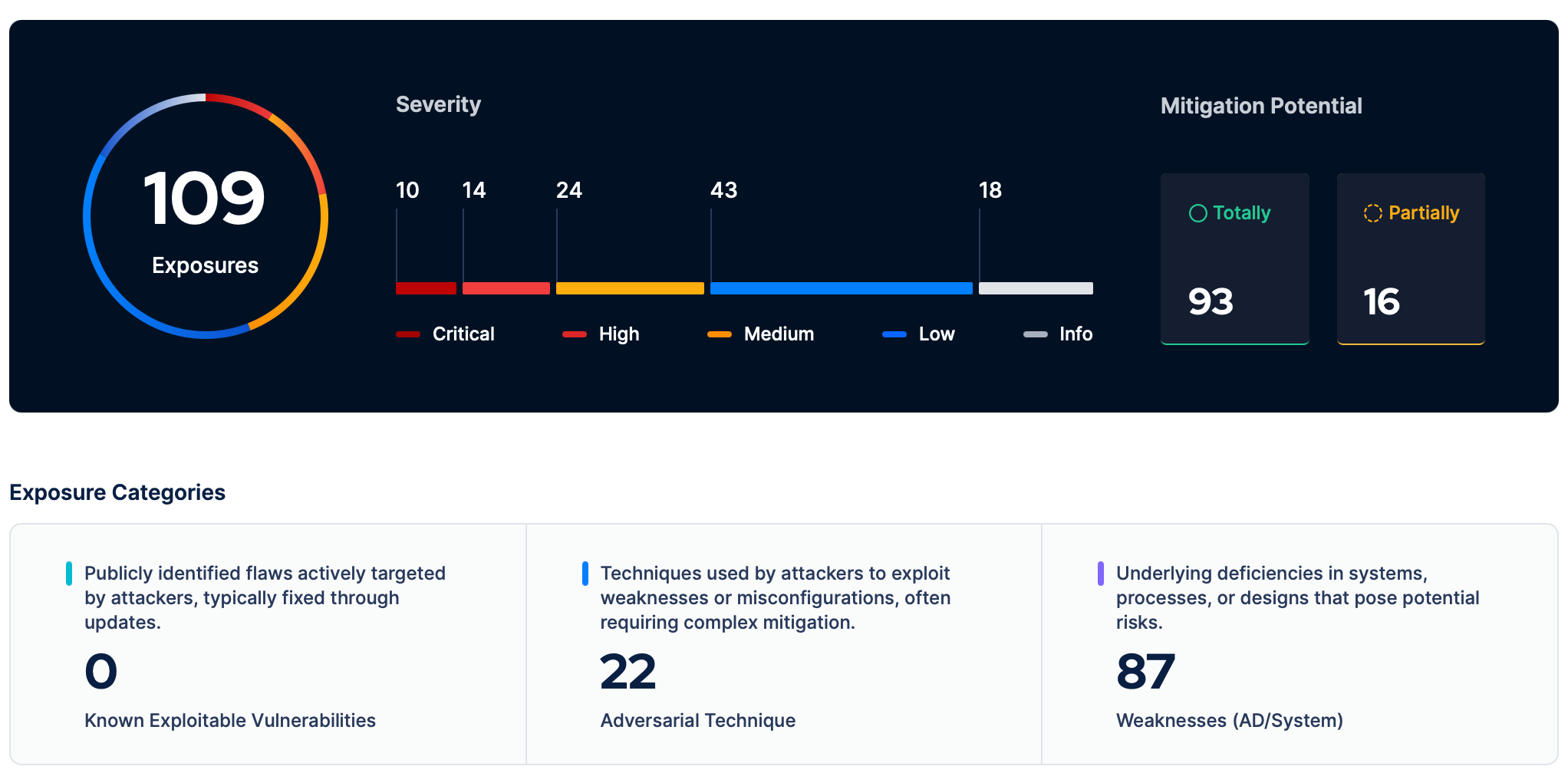
Figure 3. Number of Exposures and Mitigation Potentials Identified by Picus APV, with a Severity Score Dashboard
Prioritized mitigation guidance — including the single "highly mitigable action" that breaks the most attack paths at once.
REST API export — full attack path and findings available programmatically.
The result isn't a CVE list. It's a clear, evidence-backed picture of how an attacker reaches your crown jewels and which fix shuts down the most paths fastest.
Can an Automated Penetration Testing Tool Test Everything in My Environment in One Run?
No, not in a single run. There are practical limits, some technical and some tied to licensing scope.
- Host limits per run. Each simulation has a maximum host count; beyond that, the tool stops compromising additional machines.
- One stager at a time. Stagers can be planted across multiple network segments, but only one executes per simulation.
- One simulation per agent. Overlapping jobs are skipped.
- Domain-joined only. Non-domain machines cause the simulation to quit.
- Segmented networks need multiple agents, running in parallel — one per critical network.
For large environments, the practical approach is to start with a small set of AD hosts, expand scope incrementally, and deploy multiple agents across subnets.
A full run in production can take a couple of days to complete lateral movement and full AD coverage.
Does an Automated Pentesting Software Require Credentials to Run?
Yes, but only as a starting point. To launch the simulation, the user running the stager on the Initial Access Point must be a domain user with local administrator rights on that machine. In agent mode, two credential types are typically needed at setup: a privileged domain account (for the IAP) and a standard non-privileged domain account.
After that, the tool harvests everything else on its own; Kerberoasting, NTLM relay, LSA cache dumping, and so on. The credentials you provide are only the initial foothold, not a static requirement throughout the run.
How Does Threat Intelligence Feed Into Automated Pentesting Decisions?
Automated pentesting tools don't rely on threat intelligence feeds to make decisions. The logic is environment-driven, not intel-driven. The tool operates from an assumed breach point and dynamically identifies the shortest path to domain admin based on what it actually finds; exploitable vulnerabilities, harvestable credentials, misconfigurations, and weak controls.
That's a deliberate design choice, not a gap.
Threat intelligence belongs to Breach and Attack Simulation (BAS). BAS platforms continuously ingest new adversary TTPs, emerging malware behaviors, and CVE exploitation campaigns, then turn them into safe simulations you can run against your prevention and detection controls. That's where the "are we ready for the latest threat?" question gets answered.
The two capabilities are complementary, not competing:
- BAS tells you whether your controls would catch known adversary behavior.
- Automated pentesting shows you the real attack paths inside your network today.
Ready to See Automated Penetration Testing in Action?
Stop guessing where attackers could reach in your environment. See exactly how an automated pentest finds the shortest path to your domain admin, and which single fix shuts down the most attack paths at once.
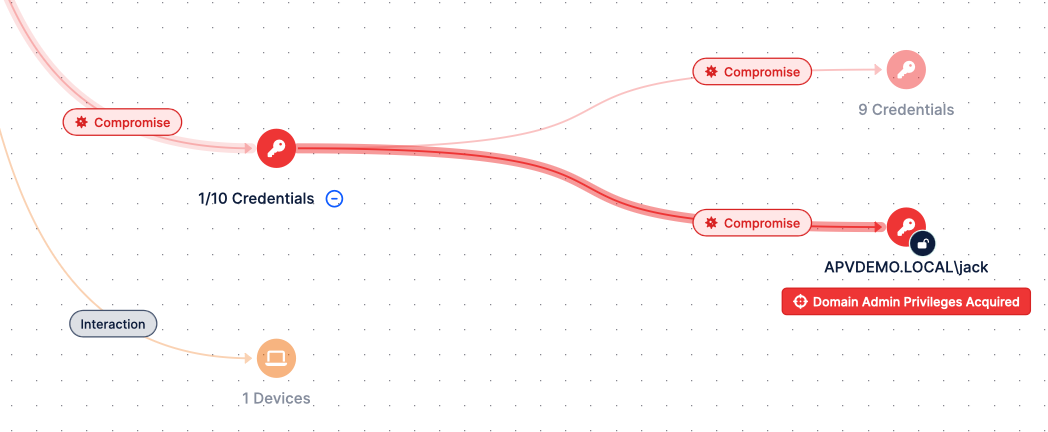
Figure 4. Picus APV Finds the Shortest Path to Your Domain Admin
See Picus Attack Path Validation in action: walk through a real attack path graph, review proof-of-exploit findings, and learn how continuous automated pentesting fits into your security validation program.


.png?width=353&height=200&name=picus-APT-cost-july21%20(1).png)
.png?width=353&height=200&name=picus-APT-vs-Red-Teaming-july20%20(1).png)