An automated penetration testing engagement runs in five sequential stages: initial access, discovery and enumeration, credential access and privilege escalation, lateral movement, and objective compromise. Each stage builds on the one before it, forming a chain that mirrors how a real attacker moves through an environment.
Here are the stages of an automated penetration testing engagement.
- Initial Access — the internal starting foothold, representing an already-compromised position inside the network
- Discovery and Enumeration — continuous throughout the entire run, feeding every stage that follows
- Credential Access and Privilege Escalation — harvesting credentials and elevating privileges to move meaningfully through the environment
- Lateral Movement — pivoting across reachable systems using captured identities and AD trust relationships
- Objective Compromise — reaching the defined goal: domain admin, sensitive data access, or ransomware-grade impact
Four of the five stages are a sequential chain. Discovery is the exception. It runs continuously and updates the tool's decision logic in real time.
Is Automated Penetration Testing an External or Internal Assessment?
Automated penetration testing is strictly an internal assessment. It operates under an assumed breach model, meaning it doesn't simulate an attacker trying to break in from outside. It starts from a machine already inside your network and works from there.
- The question it answers isn't "can someone get in?"
- It's "once someone is in, how far can they go?"
This has a few practical implications. The tool only operates on domain-joined Windows machines. Web applications, mobile systems, SCADA environments, and non-AD assets are outside its scope. It's built for Active Directory lateral movement, not perimeter testing.
Do the Stages of an Automated Pentest Match MITRE ATT&CK Tactics?
Yes. Every stage of an automated pentest maps directly to MITRE ATT&CK tactics. The kill chain follows a consistent sequence:
|
Stage |
MITRE ATT&CK Tactic |
|
Reconnaissance & Enumeration |
Reconnaissance + Discovery |
|
Exploitation |
Initial Access / Execution |
|
Discovery |
Discovery (LDAP queries, AD enumeration, user/asset scanning) |
|
Privilege Escalation |
Privilege Escalation (Kerberoasting, ESC cert abuse, service exploitation) |
|
Credential Access |
Credential Access (LSASS dumping, Pass-the-Hash, NTLM relay) |
|
Lateral Movement |
Lateral Movement (SMB/WMI remote execution, PsExec-style pivoting) |
|
Impact |
Impact (ransomware emulation, file encryption, domain admin compromise) |
The techniques listed above are examples. Each stage covers a broader set depending on what the environment exposes.
An automated pentesting software executes each stage in sequence, chaining techniques the same way a real attacker would, and only moves to the next hop when the current one succeeds.
What Happens if an Automated Pentest Fails at One of the Stages?
It adapts. A failed stage does not stop the simulation. The AI-based decision engine inside an automated pentesting tool behaves like a real attacker: objective-driven, not sequential. It has one goal: reach domain admin. And it finds a way around whatever blocks it.
Here is what happens when an automated pentesting stage fails:
- Tries alternative techniques. The decision engine rotates through hundreds of vulnerabilities and techniques automatically, selecting the next best option based on what the environment exposes.
- Pivots to another machine. If privilege escalation fails on the current host, the tool moves laterally to a different machine and restarts the kill chain from there.
- Skips ahead when possible. If domain admin credentials are reachable without completing every stage, it takes the shorter path.
- Records every block as a finding. Blocked actions are logged and reported as evidence of working controls — EDR catching a stager, SMB signing stopping a pivot, and so on.
- Reports partial results. If the tool cannot reach domain admin, any credentials harvested, misconfigurations found, or paths partially completed are still surfaced in the output.
How Long Does an Automated Penetration Test Take?
There is no fixed duration for an automated penetration test. How long a run takes depends on environment size, network complexity, and configured scope.
|
Environment |
Approximate Duration |
|
Small or targeted simulation |
~1 hour |
|
Demo or limited scope |
25–30 minutes |
|
Typical mid-size environment |
6+ hours |
|
Large enterprise |
Several days to 1 week |
|
Maximum configurable window |
7 days |
After 7 days, the simulation auto-quits regardless of progress.
A few things worth knowing. Duration is configurable. You can set the maximum window, and the simulation stops when it reaches domain admin or the timer runs out. Shorter windows risk incomplete coverage, so longer runs are recommended for comprehensive results. Only one simulation runs per agent at a time; if schedules overlap, the second job is skipped.
How Is Lateral Movement and Privilege Escalation Handled Autonomously?
An automated penetration testing tool handles both stages without human input. At every step, it assesses the current context, selects the next technique, and decides whether to escalate privileges or move laterally based on what the environment exposes.
Here is how each stage works:
Privilege escalation. The tool checks the current user's context and looks for exploitable misconfigurations, vulnerable certificates, service exploits, and weak password policies. If admin rights are obtainable, it escalates. If not, it moves on and tries from a different position.
Lateral movement. Once credentials or hashes are obtained, the tool authenticates to adjacent machines using SMB, WMI, Pass-the-Hash, Pass-the-Ticket, or Pass-the-Certificate. This is real lateral movement: it switches context within the machine and uses it to pivot to the next hop. Not a simulated path, an actual one.
Credential-driven throughout. Every lateral movement action is tied to credentials harvested from the environment. No hardcoded paths, no assumptions.
What Does Post-exploitation Look Like in an Automated Run?
Post-exploitation in an automated pentest covers two objectives: domain admin compromise and ransomware emulation.
Domain admin compromise. The tool reports the exact credential obtained, which machine it came from, and how it was accessed. All domain admin accounts discovered during the run are listed with proof.
Ransomware emulation. The tool searches for encryptable files across reachable machines, copies them without touching the originals, and performs mass encryption on the copies — including shadow copy deletion. No actual ransomware payload is executed. It is behavioral emulation only. File encryption can be toggled on or off per simulation.
No cleanup required. The tool leaves no artifacts behind after the run.
Ready to See Continuous Automated Penetration Testing in Action?
Stop guessing where attackers could reach in your environment. See exactly how an automated pentest finds the shortest path to your domain admin, and which single fix shuts down the most attack paths at once.
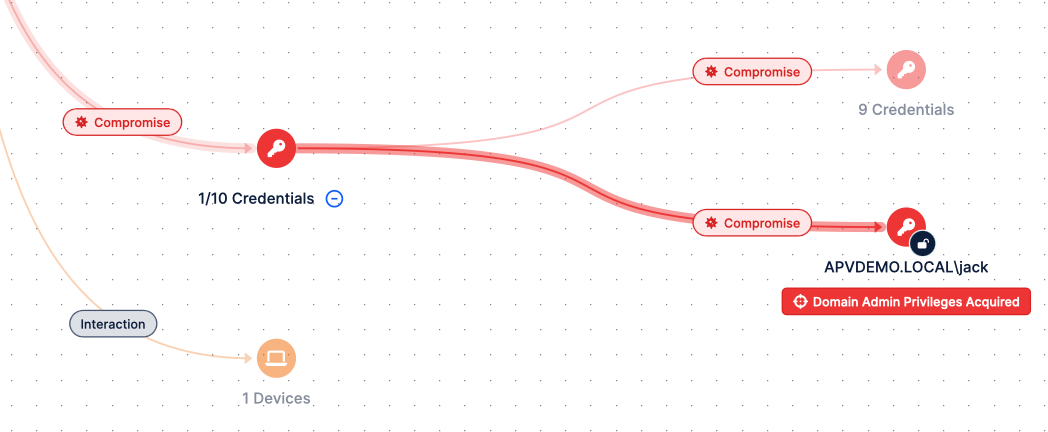
Figure 4. Picus APV Finds the Shortest Path to Your Domain Admin
The best way to experience Picus’ Attack Path Validation is through a live demo or a Proof of Concept (POC) run directly in your environment. You will walk through a real attack path graph, review proof-of-exploit findings, and learn how continuous automated pentesting fits into your security validation program.


.png?width=353&height=200&name=picus-APT-cost-july21%20(1).png)
.png?width=353&height=200&name=picus-APT-vs-Red-Teaming-july20%20(1).png)