Automated penetration testing finds five categories of validated, exploitable exposures: software vulnerabilities confirmed through successful exploitation, misconfigurations that open reachable attack paths, weak or reused credentials that yield access, identity and Active Directory weaknesses that enable privilege escalation, and the full attack chains that connect those individual findings into a route to a high-value objective such as domain admin access or ransomware-grade impact.
Every finding shares the same defining characteristic: it was confirmed by successful exploitation in the live environment, not inferred from a version banner or a CVE database.
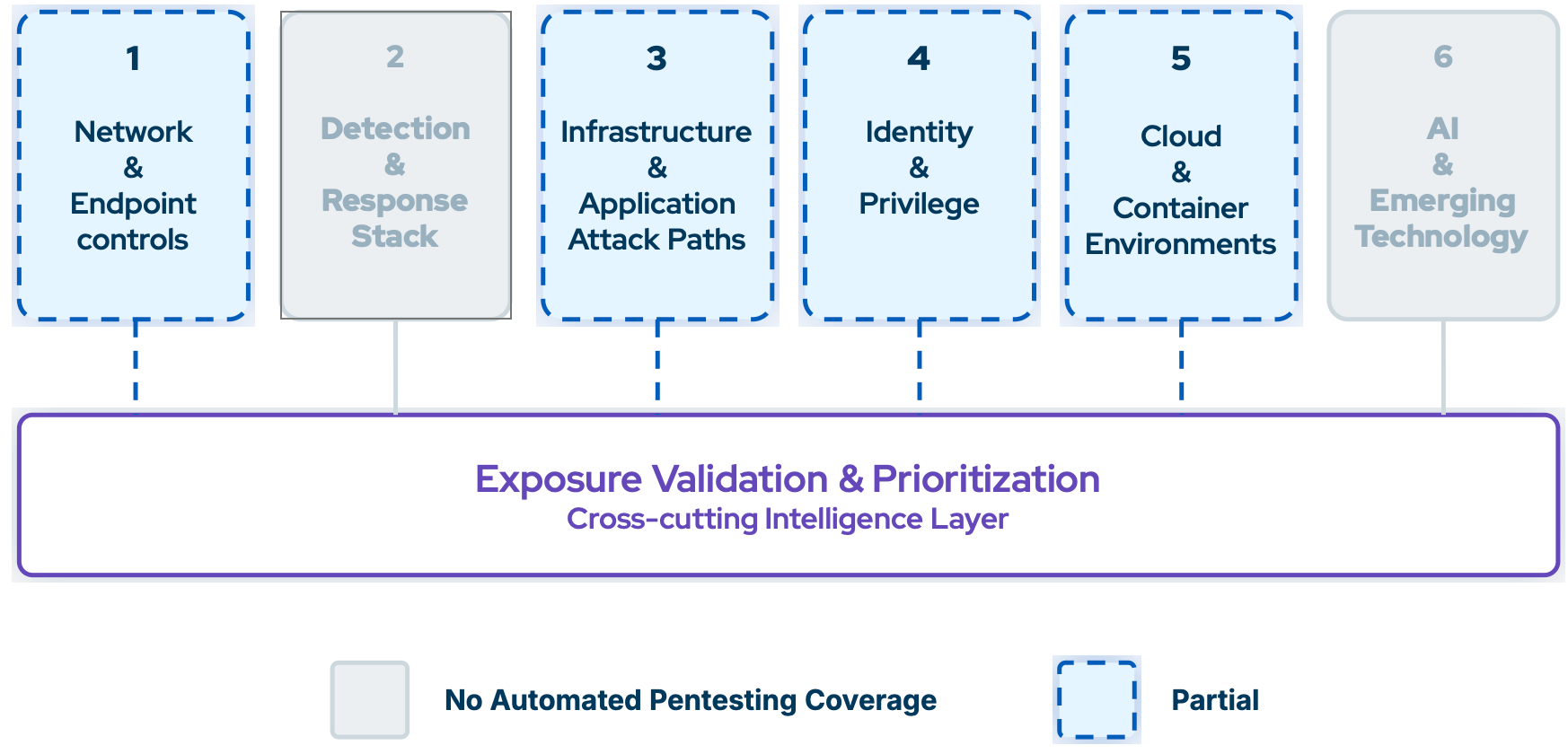
Figure 1. Automated Penetration Testing Finding Coverage
What automated penetration testing does not find:
- Whether your SIEM rules fired on the techniques the tool exploited
- Whether your firewalls, WAF, IPS, or DLP actually block what they are configured to stop
- Cloud and container misconfigurations at depth
- AI and LLM guardrail weaknesses
- Detection rule drift that accumulated silently over time
These questions are answered by other validation layers. Automated penetration testing is one input. A complete validation program requires the others. Read the whitepaper to learn more about it.
How Is an Automated Pentesting Finding Different From a Vulnerability Scanner Finding?
An automated penetration testing tool finds confirmed exploits, not theoretical weaknesses. If the attack ran and succeeded in your environment, it is a finding. If it did not, it is not. Vulnerability scanners identify gaps in software versions. Automated pentesting identifies gaps in your security controls.
|
Dimension |
Vulnerability Scanner |
Automated Penetration Testing |
|
Nature |
Theoretical exposure based on version matching |
Confirmed exploitation in your environment |
|
Proof |
"This version is vulnerable to CVE-X" |
"We exploited CVE-X and reached domain admin via this path" |
|
False risk |
High — many critical CVSS scores are non-exploitable |
Low — only surfaces what it could actually execute |
|
AD misconfigs |
Largely undetected |
Core finding category: ACLs, GPO gaps, delegation issues |
|
Attack chain |
Individual vulnerabilities in isolation |
Chained path from a domain-joined initial access point to domain admin |
|
Remediation priority |
CVSS score |
Actual exploitability and impact on attack path continuity |
The key distinction: a vulnerability scanner tells you what is theoretically vulnerable. An automated penetration testing tool tells you whether an attacker can actually exploit it given your specific controls, and what they can reach if they do.
Does an Automated Pentest Find Zero-Day Vulnerabilities?
Not directly. Automated penetration testing operates on known, named vulnerabilities and techniques. It requires a CVE or a known exploit technique to run an attack, it does not discover novel unknown vulnerabilities on its own.
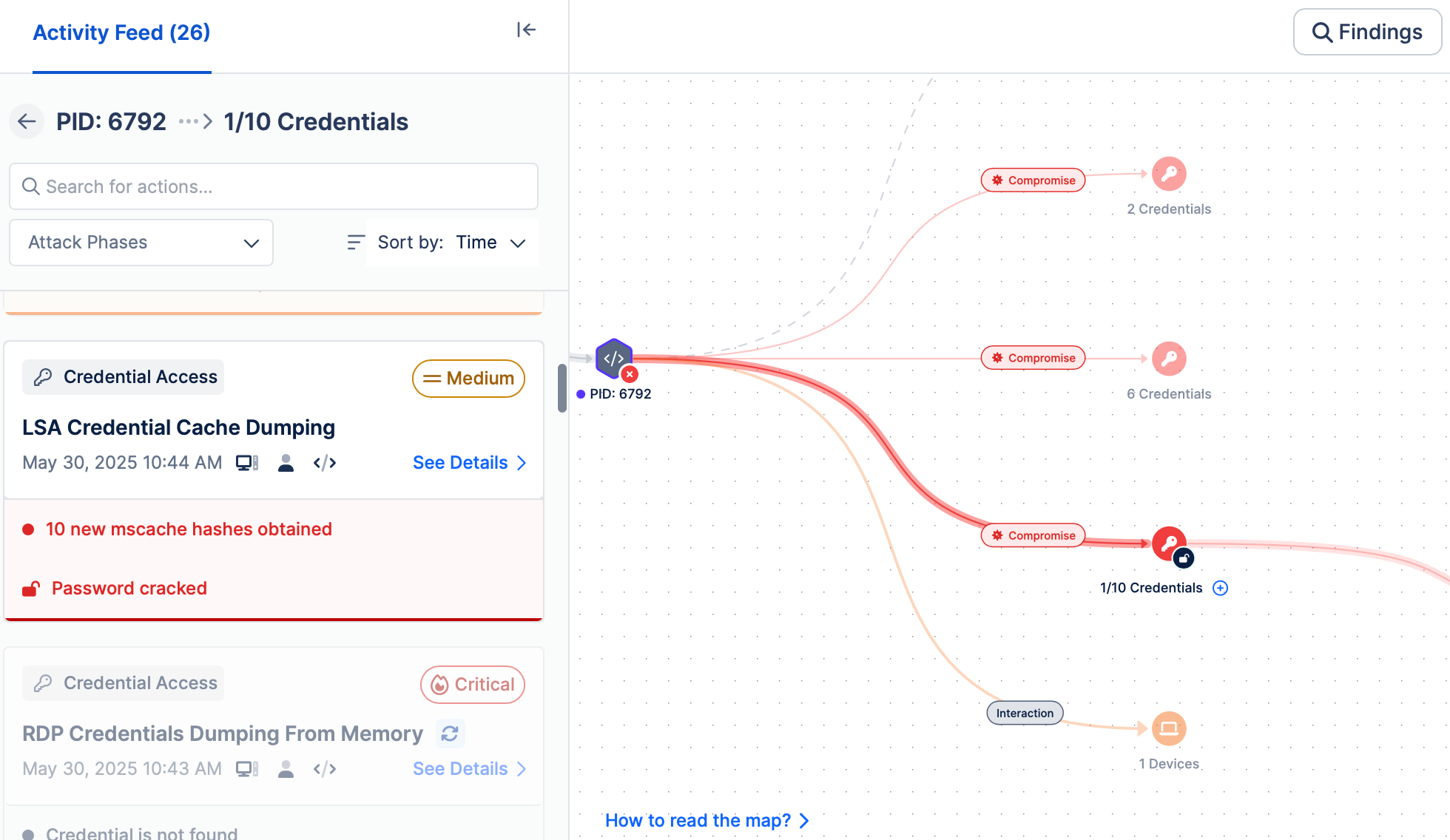
Figure 2. Automated Penetration Testing Tools Test Internal Networks Against Known Attacker Behaviors like Credential Dumping Attacks; LSA Credential Cache Dumping Attack Technique
People often conflate these two. Threat library coverage, meaning how quickly a vendor adds new CVEs, 24-hour SLAs, daily updates from CISA KEV and APT group TTPs, belongs to Breach and Attack Simulation, not automated pentesting. BAS answers "are we protected against the latest known threats?" Automated pentesting answers a different question: given what already exists in my environment, how far can an attacker get?
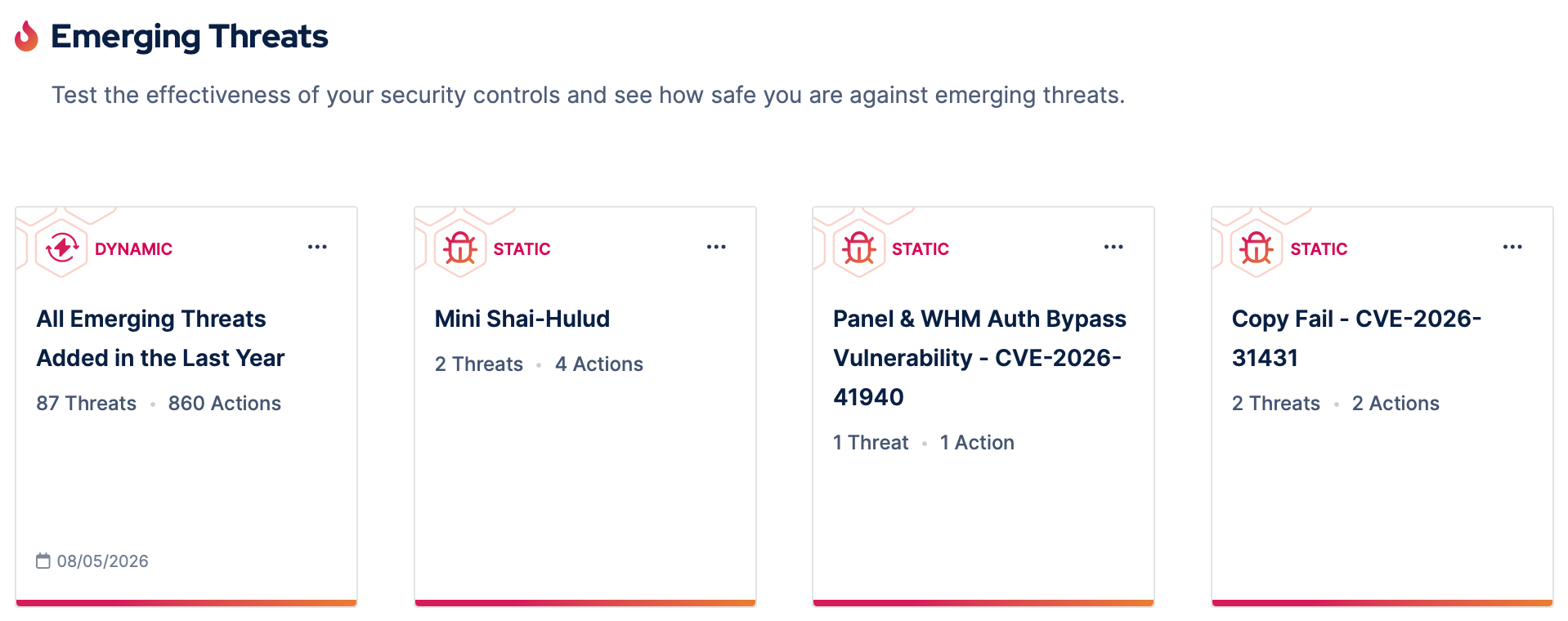
Figure 3. Emerging Threats Are Part of the Picus Security Control Validation, Which Is Powered by BAS Technology
One nuance: even without the exact CVE, techniques from the same vulnerability class can still be tested as a proxy.
What Is the Most Valuable Finding Automated Penetration Testing Produces?
The most valuable finding is the shortest confirmed attack path to domain admin, proven by actual credential capture, not inference. This single output answers the question that matters most to both security teams and leadership: if an attacker gets inside, how far can they go, and through exactly which steps?
Why this finding stands above all others:
- It is proven, not theoretical. Domain admin credentials are obtained during the live run. Hash values are surfaced as evidence. This is a confirmed compromise on record, not a risk score or a prediction.
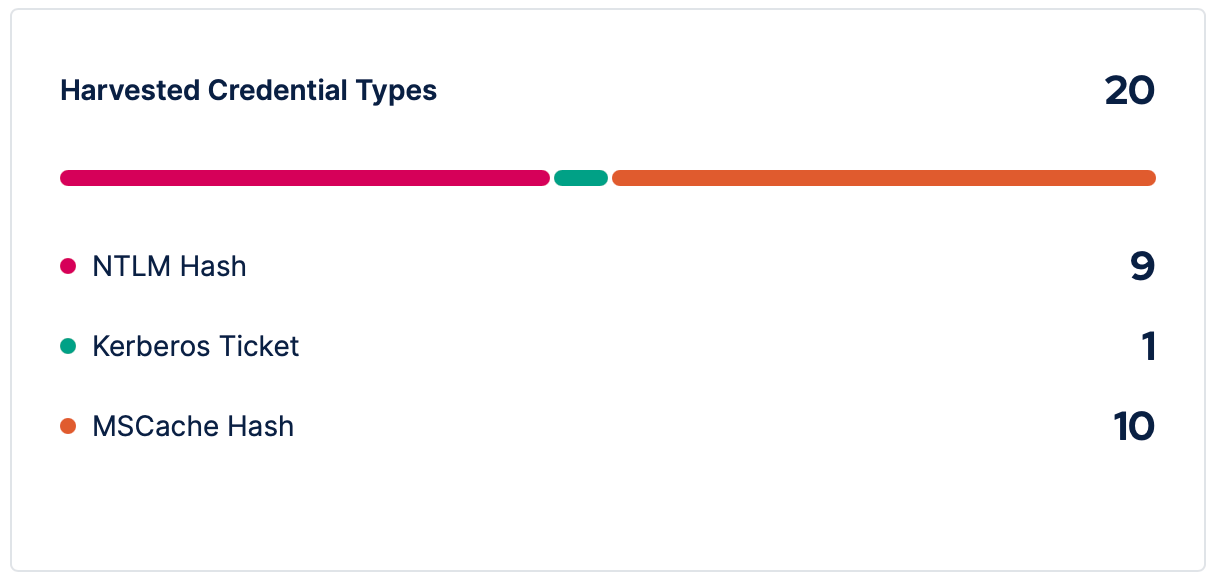
Figure 4. Harvested Credential Types from an Arbitrary Automated Penetration Test Conducted by Picus APT
- It identifies the highest-leverage remediation. The tool pinpoints the single control change that breaks the most attack paths at once. One fix, maximum disruption to attacker options.
- It forces the Active Directory conversation. AD misconfigurations are among the most prevalent and most avoided issues in enterprise environments. Teams often know gaps exist but lack the evidence to justify touching AD. A confirmed exploit path removes that ambiguity.
- It makes remediation progress measurable. Re-running the tool after fixes shows exactly how many paths were closed. The attack path count becomes a concrete, trackable security metric over time, not a one-time audit result.
Will the Same Automated Pentest Find the Same Things Every Run?
Not exactly, and that variability is by design. Each run is a fresh simulation against your current environment. Results shift when the environment shifts: remediation closes paths, configuration drift opens new ones, new accounts or machines change what is reachable. Unpatched exposures reappear reliably until they are fixed, which makes run-to-run comparison a practical way to measure remediation progress.
One expectation worth setting with leadership: in an unchanged environment, each successive run produces fewer new findings. The first run of an automated pentesting tool surfaces genuinely new attack paths. By run three or four, the tool is mostly confirming what it already found. This is known as the PoC cliff — the point where a fixed-scope tool running against a deterministic surface stops surfacing new findings.
Run frequency should match the pace of environmental change, not a calendar. Automated penetration testing delivers the most value when the environment is actively shifting, new machines, new users, new configurations.
Do Automated Penetration Testing Tools Find Business Logic Flaws?
No. An automated penetration testing tool is purpose-built for infrastructure, identity, and Active Directory attacks. Business logic flaws are outside its scope.
What automated penetration testing does not test:
- Business logic flaws (unauthorized actions a legitimate user can perform)
- Web application vulnerabilities (XSS, SQLi, IDOR)
- API-level authorization and access control issues
- Application workflow abuse
These require human testers or specialized DAST and API security tools.
What automated penetration testing does cover:
- Network-layer attacks (SMB signing, NTLM relay, network poisoning)
- Identity and AD attacks (Kerberoasting, credential dumping, delegation abuse)
- Host-level privilege escalation (local exploits, service path hijacking)
- Lateral movement between domain-joined machines
The scope is deliberate. Automated penetration testing goes deep on the attack surface that matters most in an assumed breach scenario: the path from a compromised internal machine to domain admin.
Does Automated Pentesting Software Miss Chained Vulnerabilities?
No, chaining is actually what automated penetration software is designed to do. It does not test vulnerabilities in isolation. It chains techniques together to map the full path from initial foothold to domain admin.
However, there is an important structural limitation. The chain is sequential and dependent. If the tool gets blocked at an early stage, everything downstream never executes. A failure at privilege escalation means lateral movement and objective compromise go untested in that run. One blocked step near the top creates a cascading blind spot across every technique that depended on it.
This is different from missing chained vulnerabilities by design. It is missing them by circumstance, based on what your controls happen to block first.
The practical implication: running from multiple initial access points and with different starting credentials increases coverage. A path blocked from one starting position may be open from another.
Can Automated Penetration Testing Tools Discover Authorization Flaws in APIs?
No. An automated penetration testing tool does not interact with application APIs or test authorization logic at the API layer. It operates exclusively at the network and Active Directory infrastructure level.
Domain-joined Windows environments are the scope. Mobile, SCADA, web applications, and non-AD systems are not supported.
For API authorization testing, you need dedicated tooling:
- DAST tools (Burp Suite, OWASP ZAP) for web and API security testing
- Dedicated API security platforms for runtime authorization flaws
- Manual penetration testing for complex business logic in APIs
Automated penetration testing goes deep on one thing: the AD and identity kill chain from assumed breach to domain admin. API authorization is a different problem that requires different tools.
How to Manage False Positives and Noise From Automated Pentest Results?
Automated penetration testing is low-noise by default. The tool only reports what it could actually exploit. A finding means the attack succeeded, not that a vulnerability might exist.
The most common sources of confusion:
- EDR blocking the stager. The stager is the lightweight executable the tool deploys on the Initial Access Point to begin the simulation. If your EDR blocks it, the simulation reports failures that are actually true positives — your controls are working. Adding SHA256 hash allow-lists for the tool's binaries lets you test AD-layer controls without interference.
- Scope misconfiguration. Running the tool on unintended machines produces noisy results. Use include and exclude IP settings to tighten scope before each run.
- Excessive starting privileges. If the Initial Access Point credential has too many privileges, results will not reflect real attacker conditions. Use a standard domain user as the starting foothold.
- Findings vs. exposures. Two different lists. Findings are informational. Exposures are confirmed exploitable vulnerabilities. Focus on exposures.
- Re-run after remediation. If the finding does not reappear, the fix worked.
Ready to See Automated Penetration Testing in Action?
Stop guessing where attackers could reach in your environment. See exactly how an automated pentest finds the shortest path to your domain admin, and which single fix shuts down the most attack paths at once.
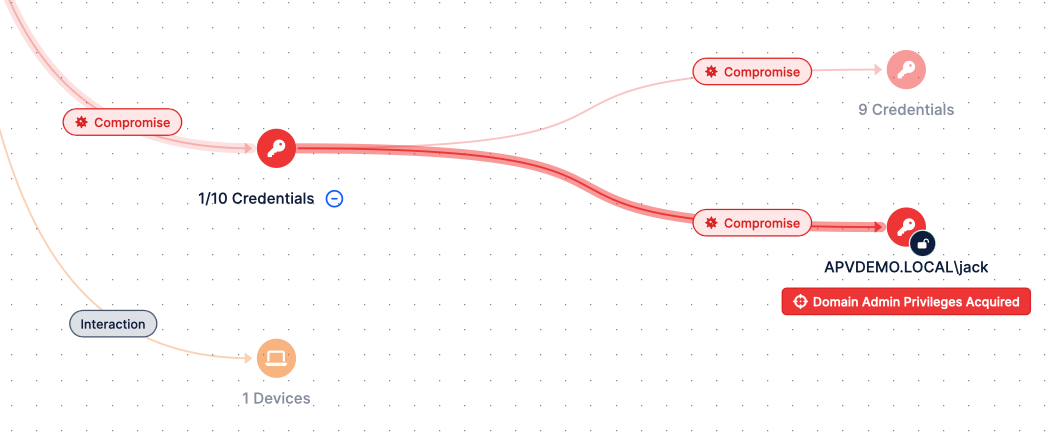
Figure 4. Picus APV Finds the Shortest Path to Your Domain Admin
See Picus Attack Path Validation in action: walk through a real attack path graph, review proof-of-exploit findings, and learn how continuous automated pentesting fits into your security validation program.


.png?width=353&height=200&name=picus-APT-cost-july21%20(1).png)
.png?width=353&height=200&name=picus-APT-vs-Red-Teaming-july20%20(1).png)