Very little, and far less than the deployment most security tools demand. An automated pentest runs from a single initial foothold and spreads from there the way a real intrusion does, so the footprint is one starting point plus the connectivity to reach the rest of the environment.
Three pieces do the work:
- a rule-based decision engine (not agentic, but built on a sophisticated logic) that decides what to do in place of a human operator;
- an encrypted C2 server; and
- the implant, the code that actually runs on a compromised host.
You trigger the first implant on the foothold with a loader (a double-click binary, a PowerShell one-liner, or an Office document). The loader pulls a stager into memory, the stager reflectively loads the implant, and the implant connects back to the C2 server. From there the logic-based decision engine drives the run: the implant harvests credentials and system data, and through access actions it spawns fresh implant sessions on other hosts to move laterally and escalate.
|
A note on terminology, because "agent" means two different things and the overlap confuses people. In this article, it never means a software agent installed on your hosts, the kind that an EDR or vulnerability scanner deploys on every endpoint. An automated pentest installs nothing like that. Where "agent" comes up later, in autonomous pentesting, it means something else entirely: a reasoning component in an AI-based, agentic system, spun up on demand to decide and carry out the next move, not a piece of software sitting on your endpoints. |
Do you need to install software on every host for an automated pentest?
No, and this is the clearest line between an automated pentest and the tools security teams already run. Vulnerability scanners and EDR need a persistent agent on every endpoint they cover. An automated pentest needs none of that.
It works from the single foothold described above. The implant only ever lands on a host the run has actually reached, and only for as long as the run needs it; everywhere else, there is nothing deployed and nothing to maintain. That is the point of an assumed-breach test: it doesn't watch your estate from the inside, it moves through it the way an attacker would, touching one host at a time and leaving nothing behind.
Do you need to whitelist the automated pentesting tool in your firewall or EDR?
For an assumed-breach test, yes. You allow-list the engine's attack payloads (by file hash) on your EDR.
This surprises people, so here's the logic. An automated pentest of this kind starts from the assumption that a sophisticated attacker has already bypassed your endpoint controls, whether through an EDR-killer technique, a custom payload, or a non-standard entry point. The question it answers is: if that happened, how far could they get? Allow-listing the payload hashes lets the test proceed under that assumption instead of being stopped at step one. You typically leave your other controls (NDR, network controls) in place.
If the question you actually want answered is the opposite, namely "would my EDR catch these techniques?", that is a different exercise: Picus Breach and Attack Simulation (BAS), which fires safe variants of the same techniques specifically to measure detection and prevention. The two are complementary, and conflating them is the most common mistake teams make here.
What kind of network access does an automated pentest foothold need?
Two things: outbound access from the foothold to the C2 server, and network reachability from the foothold into the rest of the environment.
The implant on the foothold has to reach the C2 server over an outbound connection, since that is the channel the decision engine (logic-based decision mechanism) uses to direct the run and receive results; without it, the run can't start. From there, everything happens from the foothold's own vantage point: the implant reaches other hosts over the network the way a user on that machine could, enumerates them, and spawns fresh implant sessions where it can. To launch from the first machine ("patient zero"), you provide that host's IP, a domain user credential, the domain, and the domain controller IP. Beyond that, the foothold only needs the network reach an attacker at that position would realistically have. It earns any further access through exploitation, not through privileges you hand it.
Does an automated pentesting foothold need administrator privileges?
No. A non-privileged domain user is enough to start.
This mirrors how a real intrusion usually begins: an attacker rarely lands as a domain admin; they land as an ordinary user and work their way up. From a standard user, the implant tries to elevate on its own, searching for a misconfigured service or bypassing User Account Control when "run as administrator" wasn't used.
There is a caveat worth knowing, though. If the starting machine is well-patched and offers no escalation vector, the implant may not be able to elevate, and that limits what it finds, because the most critical attack paths come from actions that require admin rights. So a non-privileged user is the right realistic starting point, but to surface those critical paths it's worth also running the implant at higher integrity or from a more privileged user. Running from several privilege levels is how you validate paths a single low-privilege run would miss.
How many footholds do automated pentesting tools need for full environment coverage?
It depends on where you start and how your network is segmented; coverage comes from running from several starting points, not from one.
From a single foothold, the run doesn't stop at that one machine: it treats every system it can reach in the domain as a potential pivot and works outward from there. But what it can ultimately reach and prove depends heavily on where it started. A low-interaction host with only local users yields few paths; a high-value machine with many users and cached credentials, the kind of endpoint a domain admin logs into, yields far more, because the implant inherits more information and more credentials to abuse.
That is why coverage is a question of vantage points, not volume from one spot. You run from the positions that matter: a finance workstation, an IT admin's endpoint, a server segment exposed to internet-facing services. Each represents a different "what if this user got phished" or "what if this server got popped" scenario. As a practical guideline, each major segment, business unit, or trust boundary that matters to your risk model justifies its own foothold, and segments that block lateral movement need a foothold inside each isolated zone, since the run can't cross a boundary it has no path through.
Does automated pentesting work behind a web proxy?
Yes, provided the implant's outbound traffic to the C2 server is permitted through the proxy.
The only hard dependency is that the implant on the foothold can reach the C2 server. The decision engine directs the run and receives results over that channel, so if your egress goes through a proxy, that path has to be allowed; without it, the run can't start or report back. This is the same allow-listing you'd do for any outbound-connected tool: scope it once, document it, and everything else happens inside the network from the foothold.
What are the network prerequisites for an automated penetration testing run, in one list?
An outbound path from the foothold to the C2 server, network reachability from that foothold into the rest of the environment over the protocols an attacker would use (SSH, SMB, WMI), and a non-privileged domain account to launch the first implant.
A few specifics worth confirming before you start: the starting foothold is a Windows, domain-joined machine; you provide its IP, a domain user credential, the domain, and the domain controller IP to launch from it; and host hardening such as an aggressive EDR or SELinux policy on the foothold can block the implant from running, so that host may need a narrow exclusion, or you allow-list the payload by hash as covered earlier. None of these are heavy, but each is the kind of detail that turns a two-week access request into a two-hour one if you capture it up front.
How is autonomous penetration testing different from automated pentesting?
The offensive work is the same discipline either way: discovery, exploitation, credential abuse, lateral movement, privilege escalation. What sets autonomous pentesting apart sits one layer above the pentest itself: who decides the next move, and what starts the run in the first place.
Who decides the next move
Automated pentesting picks its next move from logic written in advance: decision trees, heuristics, and conditional flows authored by engineers. Inside those boundaries, it is reliable and repeatable. At the edge of them, it stops, not because it decided to, but because there is no branch left to consult. No reasoning happens about why a step failed or whether another path exists.
Autonomous pentesting replaces that fixed logic with a reasoning layer. A lead coordinator decides each move in real time from the current context (what has been discovered, which credentials are now in hand, which paths look promising) and works past a failed step the way a human attacker would. Underneath, it is a multi-agent system: the coordinator spins up specialist agents for discovery, exploitation, lateral movement, and privilege escalation only as each phase requires, then retires them once their work is done. Every agent's input, decision, and evidence is readable at each handoff, which keeps the run auditable rather than a black box.
What starts the run in the first place
Automated pentesting waits for someone to scope and schedule a run. Autonomous pentesting scopes itself from a signal: a newly disclosed CVE, fresh threat intel on an actor's TTPs, an infrastructure change, or a finding from another control. It identifies the affected assets and launches on its own, which matters because the gap between disclosure and exploitation has collapsed to as little as a day; a run sitting in a human's queue over a weekend is a run that happens after the attacker.
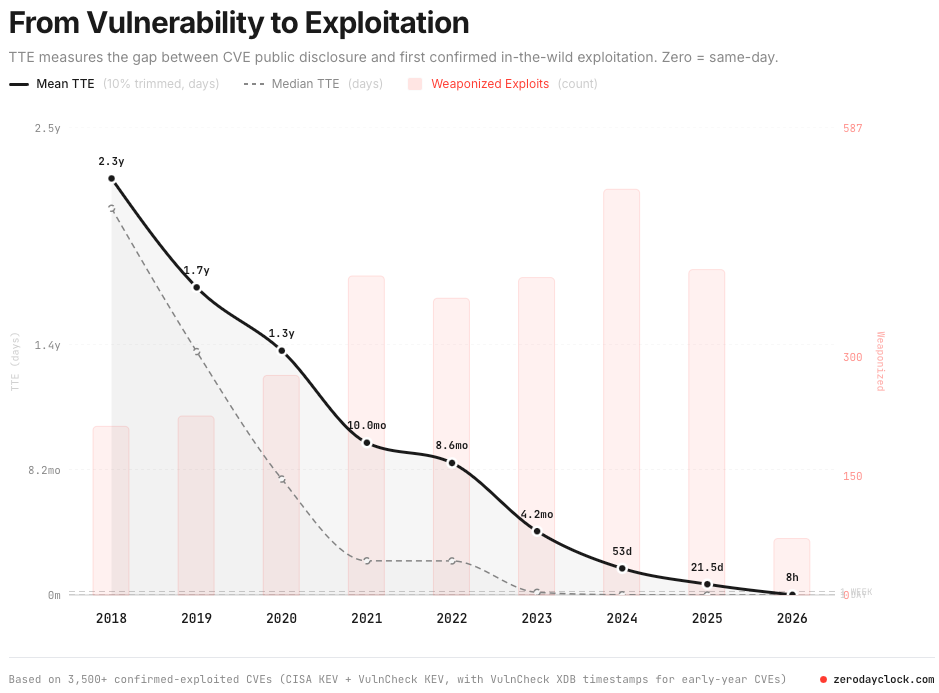
Figure 1. From Vulnerability to Exploitation by Zero Day Clock
Enter Picus Autonomous Penetration Testing
Finding the exposure was never the hard part. Proving the right call is, and that is what Picus Autonomous Penetration Testing is built to do.
It runs from a single foothold and the connectivity to reach the rest of the environment, the minimal footprint an automated pentest needs. From there, the multi-agent system described earlier does the offensive work. It scopes itself from real signals like a newly disclosed CVE or an infrastructure change, reasons and chains techniques the way a real attacker would, reaches your crown-jewel assets, and captures concrete proof of compromise, ordered by blast radius, not another ranked list. Then it loops: rank remediations by real exploitability, re-validate the exact path you fixed, and run again as the environment changes.
You stay in control the whole way. Run fully autonomous, fully supervised, or anywhere in between, with guardrails you set and every action and decision logged end to end. The output isn't another scanner list. It's a defensible answer to which attacks would actually succeed in your environment, so each call you make (Patch, Mitigate, Monitor, or Accept Risk) is backed by a validated exploit chain, not a static score.
Autonomous pentesting is the strongest proof where a live exploit can safely run, but it can only reach a fraction of your environment. For the assets a live exploit can't safely touch, and the CVEs with no working exploit yet, Picus Exposure Validation proves exploitability without firing one, and Picus Breach and Attack Simulation keeps every decision defensible as your environment changes. Autonomous Penetration Testing is one part of that loop.
Request your free demo, see what's actually exploitable in your environment, and prove it.


.png?width=353&height=200&name=picus-APT-cost-july21%20(1).png)
.png?width=353&height=200&name=picus-APT-vs-Red-Teaming-july20%20(1).png)